![SDL - 2025 New Logo.png]](https://help.getsdl.com/hs-fs/hubfs/SDL%20-%202025%20New%20Logo.png?height=40&name=SDL%20-%202025%20New%20Logo.png)
New Modules Added
The Code Enforcement, Fire Prevention, Public Works and Land Use modules are all now available in SDL Mobile4.
Service Requests
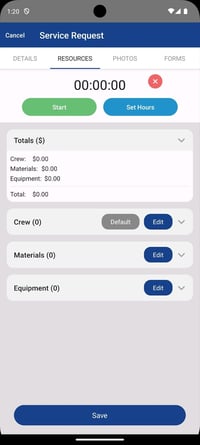
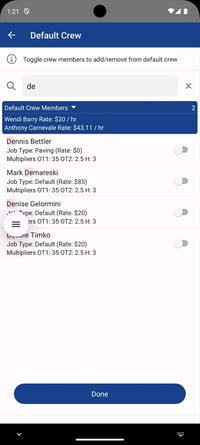
The Public Works module now supports creating new Service Requests. Users can set default crew members for quick assignment, upload photos, set timers, edit crew members, and add materials and equipment. Additionally, new Service Requests can be created from templates for greater efficiency.
Home Page Customization
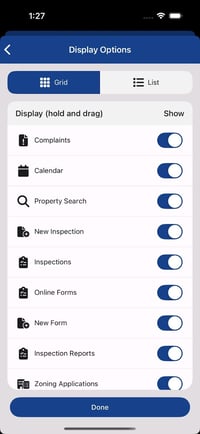
Adds the ability for users to choose which components are available on their home screen.
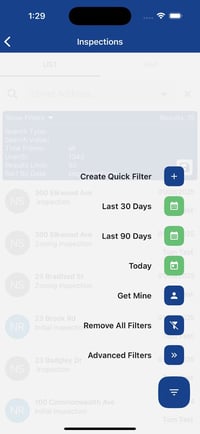
Quick filters
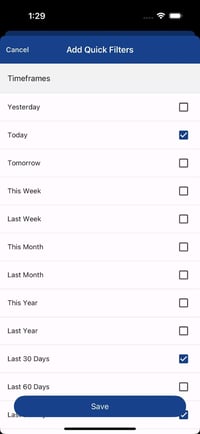
Introduces the option to create a list of quick filters. Users can choose from pre-configured filters or they can create and save their own.
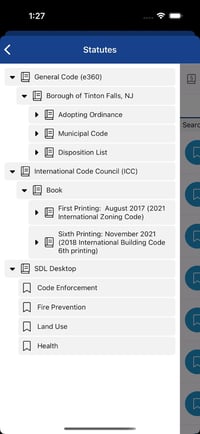
Statute Availability
Statutes can now be accessed and linked to violations directly within the mobile app.
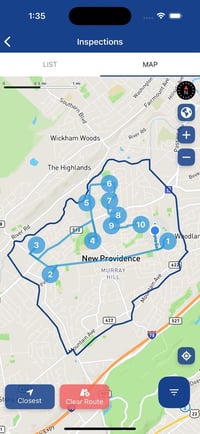
Best Inspection Route
Optimizes the inspector's route by calculating the most efficient path based on their current location and scheduled inspections. Inspectors can now also view all scheduled inspections for each location.
Fixed Issues
App crashing when opening Calendar
Fixed an issue that caused the app to crash when a user was opening the Calendar from the Home page.
Missing inspection type on re-inspection
Fixed an issue where the inspection type was blank when creating a re-inspection.
Unable to add both unit and location to fire inspection
Fixed a bug where both a unit and location could mistakenly both be added to a fire inspection.
Deleted Quick Description and Groups
Quick Descriptions and Groups deleted from the Desktop app will now be automatically removed from the Mobile app after restarting.
Missing location on Inspections
Fixed an issue where inspections created from complaints were missing location information.
Missing data on mobile inspection reports
Fixed an issue where inspection reports generated from the mobile app displayed ‘No Permit Data’ in certain fields.
Incorrect Cut-in-card status
Resolved an issue in the Construction module where the Cut-in-Card always displayed a 'Final' status, regardless of the selected status at the time of generation.
Improvements
Property Search
Improved speed and functionality, now allowing searches by My Location for greater convenience.
Schedule re-inspection
Users can now schedule a followup re-inspection when saving a re-inspection.
UI Improvements
Various optimizations for a smoother user experience.
No Connection Notification
Added an alert to inform users when their internet connection is lost.
Version Update Notification
Users will now receive a prompt when a new app version is available for download.
Inspection Start and End Times
Users will be notified if the start or end time of an inspection is invalid, preventing errors before saving.
Calendar Viewing
Users can now scroll backward to view past activity on the calendar.