![SDL - 2025 New Logo.png]](https://help.getsdl.com/hs-fs/hubfs/SDL%20-%202025%20New%20Logo.png?height=40&name=SDL%20-%202025%20New%20Logo.png)
When working with the SDL Tech Support team, they may ask you to verify your SDL Mobile App version number, to do this follow the 3 step process below:
-
In SDL Mobile, press on the hamburger
 button in the top left corner of the screen.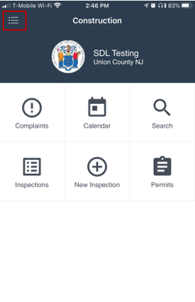
-
Select the Settings option.
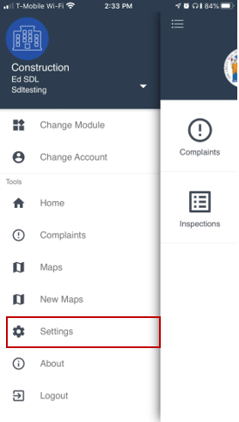
-
Scroll down until you see the ABOUT section. The number listed to the right of the words "Current Version" is your version number.
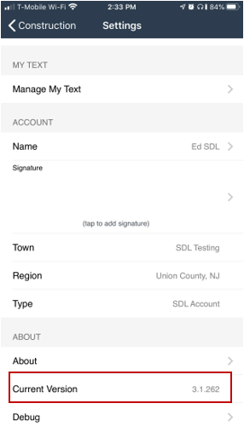
Note:
SDL Mobile 3 is no longer being updated. Users should move to a newer app:
- iPhone and iPad users can switch to SDL Field.
- Android users can switch to SDL Mobile 4.
Both SDL Field and SDL Mobile 4 are more comprehensive, actively maintained, and consistently updated, and both include an improved sync process compared to SDL Mobile 3 as well as many new features.