![SDL - 2025 New Logo.png]](https://help.getsdl.com/hs-fs/hubfs/SDL%20-%202025%20New%20Logo.png?height=40&name=SDL%20-%202025%20New%20Logo.png)
When you click Process on a Portal Request from the homepage, you may see this message:
"Workflow: Some Attachments have failed or not completed a Virus scan. You can review them on the Portal Request Form."
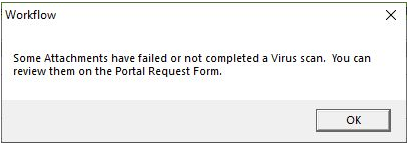
What this means: This message doesn't mean a virus was actually found. It just means one or more attached files didn't pass or finish their virus scan. It won't stop you from processing the request, but SDL Desktop won't automatically pull those specific files into the new application for you.
Understanding the two statuses:
- Failed — The file didn't pass the scan. This could mean the scan actually found a virus, couldn't fully check the file, or the file is password protected (which also shows up as "Failed").
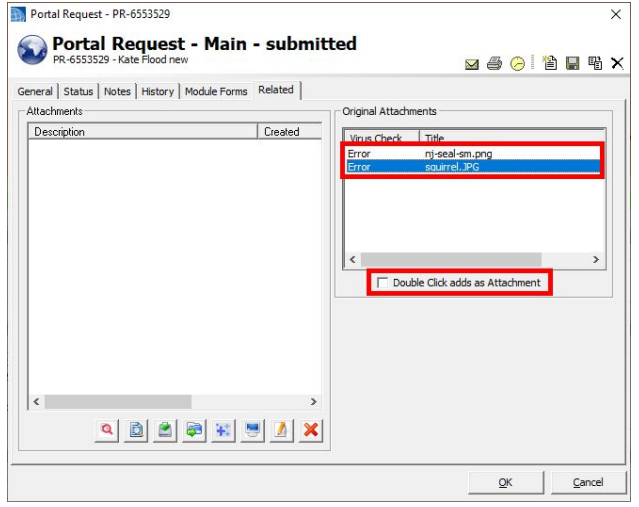
- Error — The file couldn't be scanned at all. This is usually because the file is too large, the scanning service is overloaded, or some other system limit was hit. It's a technical issue, not a security flag.
How to review the files:
- Cancel out of the request processing form.
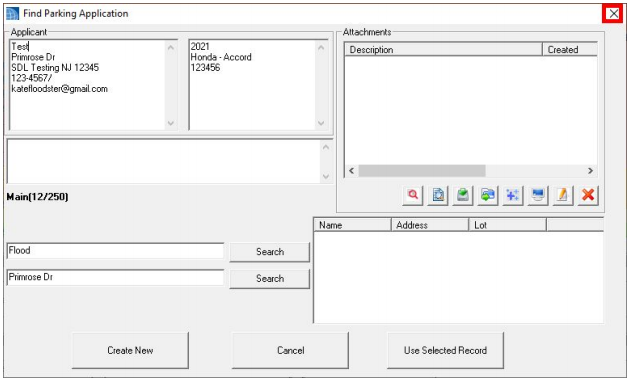
- Click the PR number on the homepage to reopen the Portal Request

- Go to the Related tab, where you'll see each attachment and its status.
- Double-click a file name to open and review it yourself, and/or check the box at the bottom to add it as an attachment to the application. You can do either or both.
What we recommend:
- If a file shows Failed, it's safest to refuse the request and let the citizen know there was an issue with their files, so they can submit a new request. Since a password-protected file looks the same as a virus detection here, we can't tell them apart, so it's better not to take chances.
- If a file shows Error, that's more likely a system limitation than anything concerning. It's fine to open and review the file yourself and add it manually if it looks legitimate.