![SDL - 2025 New Logo.png]](https://help.getsdl.com/hs-fs/hubfs/SDL%20-%202025%20New%20Logo.png?height=40&name=SDL%20-%202025%20New%20Logo.png)
Switching the Electrical / Fire Subcode Fee Schedule Version
Tools | Construction Options | Permits | “Tech Card Form Version"
There are two independent version selectors, one for the Electrical subcode and one for the Fire subcode.
Electrical can be set to Rev 1/21 (legacy version) or Rev 12/25 (new version).
Fire can be set to Rev 11/09 (legacy version) or Rev 12/25 (new version).
What the versions mean
|
Version |
Fee schedule form used |
Notes |
|
Rev 1/21 |
Legacy electrical subcode form |
Default if never changed |
|
Rev 11/09 |
Legacy electrical/fire subcode form |
Default if never changed |
|
Rev 12/25 |
Updated electrical/fire subcode forms |
Uses a separately configured fee schedule, new subcode form, and report. |
The version controls which tech card form is displayed when you open an Electrical or Fire subcode on a permit. Switching also changes which fee schedule is used when calculating fees, and which version of the tech card is printed from the related tab.
Switching versions will prompt you to confirm you want to move over to the Rev 12/25.
1. How to create a new fee schedule for Rev 12/25
You will need to create a new fee schedule for the Rev 12/25 tech cards. This is as simple as cloning the existing fee schedule, opening the clone, and setting the version control to Rev 12/25. Ensure the effective date is set to when you intend to switch over and the Active check box is checked. Old fee schedules can remain active, they will be used again if the version is reverted.
- Open the Construction Options from Tools | Construction Options.
- Navigate to the Subcodes tab.
- Highlight your current Electrical/Fire fee schedule.
- Click the Clone button.
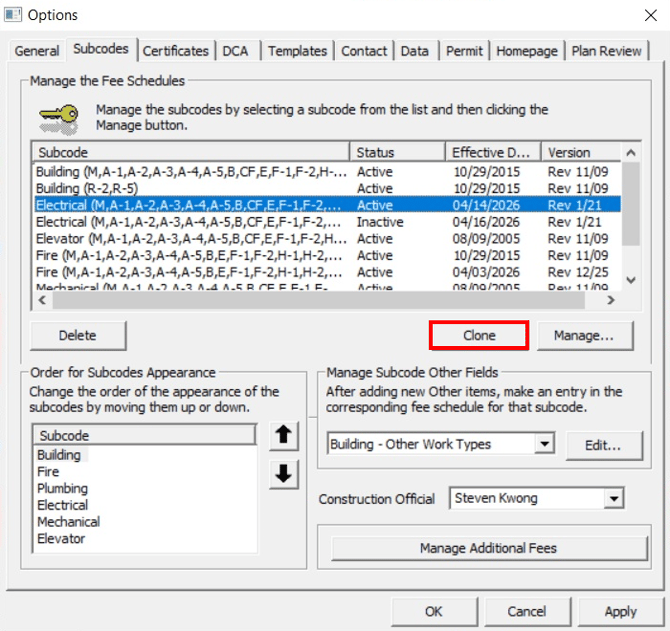
- Highlight the new fee schedule.
- Click the Manage button.
- Change the version to Rev 12/25.
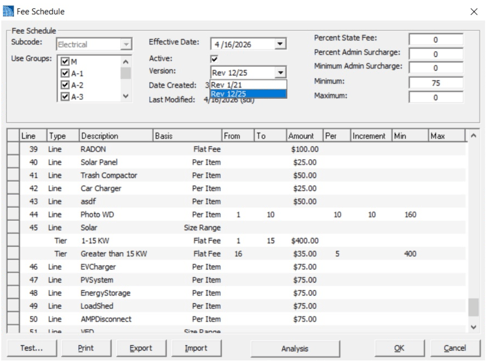
- Ensure the effective date is accurate and the Active check box is checked.
- Click OK - If you have not set the Tech Card Form Version under Tools | Construction Options | Permits to Rev 12/25, you will be prompted to do this now. Clicking “No” will save the fee schedule but it will not take effect until the version is switched.
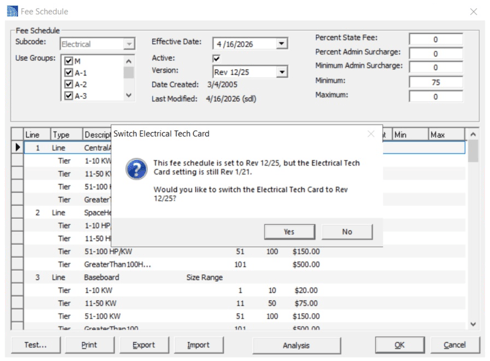
All new tech card items (EG: EVCharger, PVSystem) have been automatically added but you will need to adjust the fees and/or ranges.
If you clicked yes in step 9, you can skip section 2. To update your fee schedule, skip to section 3.
2. How to switch tech card versions
If you followed the steps in section 1 and clicked yes in step 9, you can skip this section. If you clicked no in step 9, you will need to follow these steps to finish setting this up. Go to section 3 for instructions on updating your fee schedule.
- Open the Construction Options from Tools | Construction Options.
- Navigate to the Permit tab.
- Locate the "Tech Card Form Version" look-up box near the bottom of the form.
- Click the dropdown and select the desired version (Rev 12/25 - all new versions).
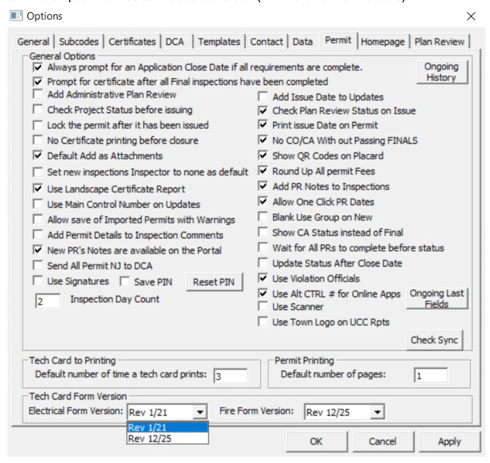
- A confirmation dialog will appear.
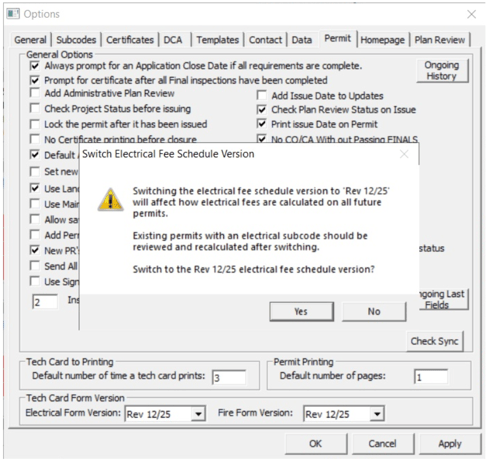
- Click Yes to confirm, or No to cancel (the dropdown will revert to the previously saved value).
What to expect
After switching to the Rev 12/25 version your electrical and fire subcodes will start calculating based on the new fee schedule. Rev 12/25 tech cards will be used when printing the fire or electrical tech card from the Construction Permit | Related tab. You will also notice new fields on the subcode forms, such as EV Charge and Energy Storage under electrical and Initiating Devices under fire.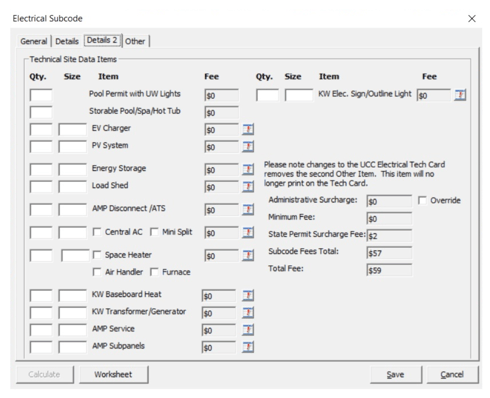
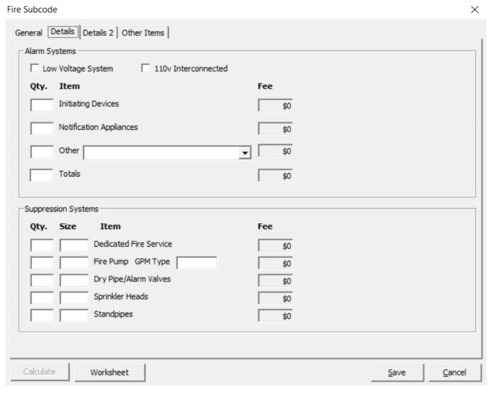
Rev 12/25 tech cards will be printed from the Construction Permit | Related tab using the same option: Electrical/Fire Tech Card under UCC Reports.
3. Updating Permit Fee Schedules
Before you begin
- Permissions: You need access to Tools > Construction Options.
- Scope: New UCC fee schedule items have been pre-inserted for the Electrical and Fire subcodes with a default per-item amount of $75. You must set your town’s actual fees.
Exact labels matter. Do not edit the pre-inserted item labels (capitalization, spacing or spelling). Changing labels will break field-to-fee matching.
Navigate to Fee Schedules
- Open Tools > Construction Options.
- Select the Subcodes tab.
- Pick a subcode (e.g., Electrical or Fire). You will see the fee schedule entries, including newly inserted UCC items at the bottom.
New fields for 2026
Electrical
- AMPDisconnect
- EnergyStorage
- EVCharger
- LoadShed
- PVSystem
Fire
- CleanAgentSuppresion
- DedicatedFireService
- DryWetChemical
- ERCCSystem
- ExitSigns
- HazardousExhaust
- InitiatingDevices
- NotificationAppliances
- PortableFireExt
- MiniSplit
- AirHandler
- Furnace
Update fee amounts (flat/per-item/quantity-based)
- Open the desired subcode and select the correct fee schedule (by use group if applicable).
- Locate the new UCC items (as shown above). They will appear with a default per-item fee of $75.
- Choose the appropriate charge method for your town’s policy.
- Per item: Enter the amount charged per unit (e.g., per fixture/device).
- Quantity-based or size-based: Select the calculation mode supported by the item (e.g., by quantity, size, kW range).
- Tiered: see below.
- If an item supports multiple calculation methods, pick the one that matches your ordinance.
- Enter your town’s fee amount(s). Save your changes.
Existing permits remain unchanged. New fields and fees will apply to new permits created after this update.
Create tiered fee structures
Tiered fees automatically calculate based on entered numbers (e.g., quantity or size ranges). Use tiers when your ordinance specifies brackets or ranges.
- From the fee schedule, click on the line of the item you want to tier.
- Click the Insert button on your keyboard to add a tier.
- Define each tier with a range and amount (examples below). Save.
Tier examples
- Quantity tiering: 1–10 units = $X per unit; 11–50 units = $Y per unit; 51+ units = $Z per unit.
- Size/kW tiering: 0–10 kW = $A; >10–50 kW = $B; >50 kW = $C.
Quality checks before you finish
- Verify each use group has the correct updated schedule.
- Scan for unchanged $75 placeholders and replace with your town’s fees.
- If tiers are configured, confirm ranges don’t overlap or leave gaps.
- Ensure labels were not altered (capitalization, spacing, spelling).
Troubleshooting
- New field shows but fee doesn’t calculate: Check that the item label matches the system-inserted string exactly, and that a non-zero fee is set.
- Permit uses old fields: Only new Desktop permits use the new items. Existing permits retain prior data but can be edited if needed.
Important notes
These settings are municipality-wide and once changed it will affect all users.
The change is saved immediately, no additional save step is needed.
Reverting: To go back to Rev 11/09 or Rev 1/21, repeat step 2 under “How to switch tech card versions” and select Rev 11/09 or Rev 1/21 from the dropdown. The legacy fee schedule records are still in the system and will be picked up again immediately.
Checking the current version: The current selection for each subcode is shown in the respective dropdown under the Tools | Construction Options | Permits screen. If the field was never configured, it defaults to Rev 1/21 for Electrical, and Rev 11/09 for Fire.