![SDL - 2025 New Logo.png]](https://help.getsdl.com/hs-fs/hubfs/SDL%20-%202025%20New%20Logo.png?height=40&name=SDL%20-%202025%20New%20Logo.png)
Reconciling Fee Reports and Permit Reports
Why your fee totals and permit totals don’t match, and how to find the difference
If the totals on your Fee Item report don’t match your permit report (such as the Permit Activity Log) for the same date range, the reports are usually not wrong. They pull from two different dates. Fee Item reports are based on the payment date, meaning the day the money was collected. Permit reports are based on the permit issue date, meaning the day the permit was issued. A permit that was paid in one period and issued in another will appear in one report and not the other.
For example, a payment taken on the last day of one month for a permit issued early the next month is something that is commonly seen. It also happens when a permit was paid a long time ago and only recently issued. The reverse can occur too, when a payment is made in the current period for a permit that was issued earlier (this is less common depending on how these are issued in your town but do occur).
To find exactly where the difference is, compare two reports for only the subcodes or fee types that are off:
- Run the Fee Item report by account. In your Fee Item reports, open Reports by Account and enter the same start and end dates you used for the permit report.
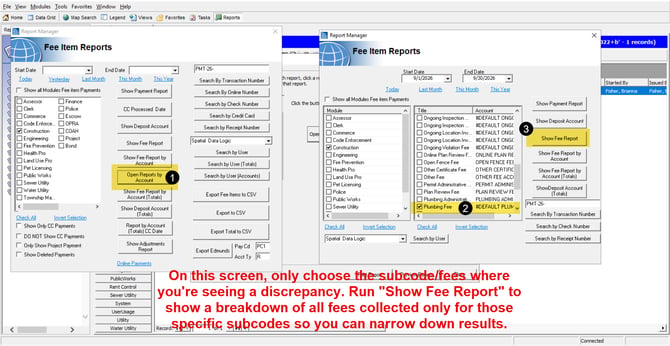
- Select only the accounts that are off. Choose just the fee accounts where you see a discrepancy, such as the Mechanical Fee Account or the Plumbing Fee Account, and run the report. This limits the results to the fee types in question.
- Run the permit breakdown for the same subcodes. Open the Permit Activity Log and click Activity Breakdown. Select the same subcodes and run it for the same date range. This lists every permit issued in that period for those subcodes.
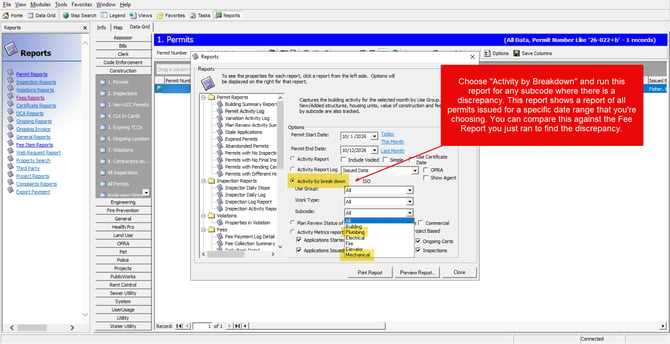
- Compare the two lists. Look for any permit that has a payment on the fee report but doesn’t appear on the permit report, or the other way around. A permit that appears in only one report was paid in a different period than it was issued. Open that permit’s fee record and compare the payment date to the issue date to confirm.
If every difference traces back to a payment date outside your date range, the reports are working correctly and the totals simply reflect two different ways of grouping the same activity. If a permit appears on the permit report but has no payment recorded at all, it may be an unpaid balance rather than a timing difference, so review that permit’s fee record.