![SDL - 2025 New Logo.png]](https://help.getsdl.com/hs-fs/hubfs/SDL%20-%202025%20New%20Logo.png?height=40&name=SDL%20-%202025%20New%20Logo.png)
To help simplify the online construction permit/plan review process, we created a new custom landing page on the SDL Portal called "Online Permits". The page features an easy-use menu that outlines each step and includes instructions to help clarify the process for the applicant.
-PNG.png?width=670&height=441&name=New%20Online%20Permit%20Page%20-%20Border%20(1)-PNG.png)
Menu items include:
- Start a permit
- Update a permit
- Check a permit status
- Access online plan review
- Schedule an inspection
- Get status notifications
- Available resources
Town Admins can enable and customize this page in the SDL Portal. The steps are below:
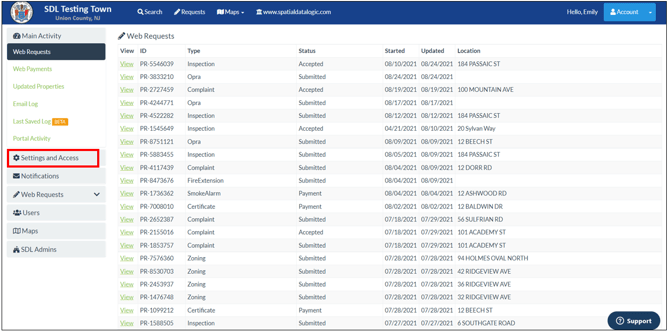
Step 1: In the town Admin settings, click on "Settings and Access"
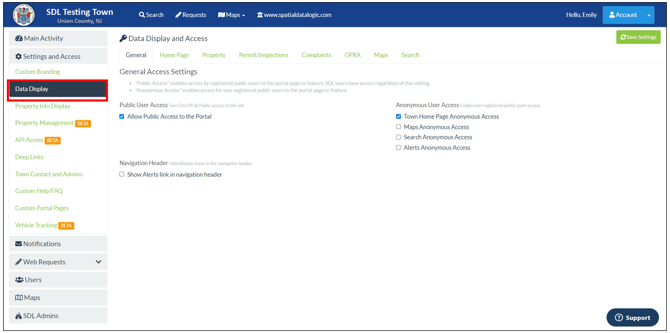
Step 2: Then select Data Display"
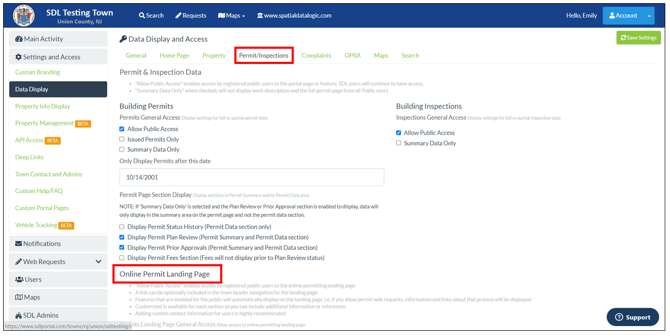
Step 3: Click the "Permit/Inspections" tab and then scroll down to the "Online Permit Landing Page" section.
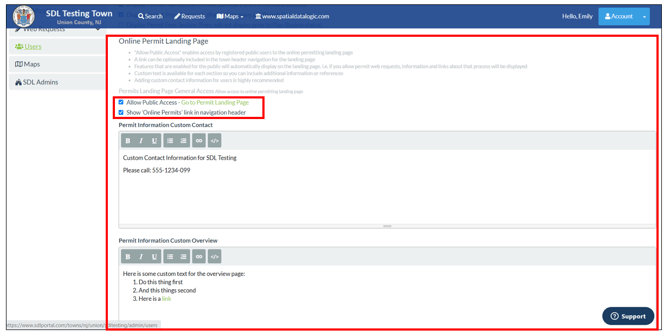
Step 4: In the "Online Permit Landing Page Section" you will be able "Allow Public Access" and add this page to your portal header by clicking "Show 'Online Permit' link in navigation header." You will also be able to add custom information/instructions/links for each step of the permitting process including:
- Contact Information - (Highly Recommended)
- Permit Overview
- Application Information
- Application Update Information
- Permit Status Information
- Plan Review Information
- Inspection Request Information
- Permit/Inspection Notification Information
- Additional Resources