![SDL - 2025 New Logo.png]](https://help.getsdl.com/hs-fs/hubfs/SDL%20-%202025%20New%20Logo.png?height=40&name=SDL%20-%202025%20New%20Logo.png)
New Features
Construction - Added Joint Plan Review Support for Construction Permits
Added joint Plan Review functionality to support new state regulations for Solar and other permit types that require cross-subcode plan reviews.
What's new:
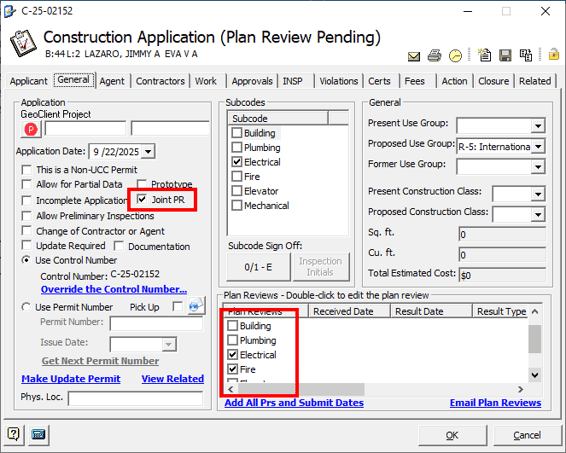
- "Joint PR" option on Construction Applications to enable joint plan review
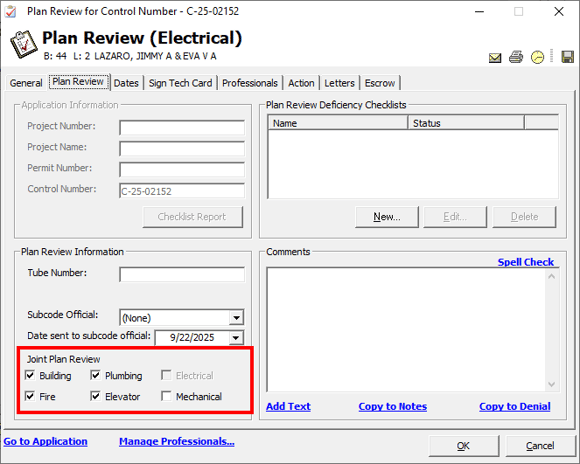
across all subcodes - Individual subcode selection for joint plan reviews (Building, Electrical,
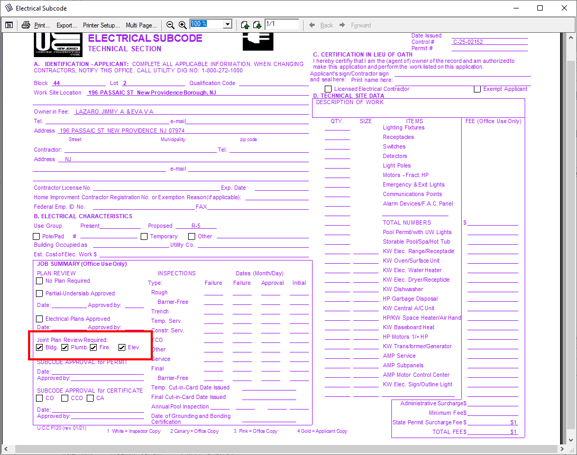
Plumbing, Fire, etc.) - Tech Card reports now display joint plan review checkboxes based on plan
review settings - Automatic subcode filtering prevents selecting the current permit's subcode
as a joint review
How it works:
-
Mark a permit as "Joint PR" on the Construction Application
-
Configure which subcodes require joint plan review in the Plan Review section
-
Tech Cards automatically display the appropriate joint plan review checkboxes
Fixed Issues
All Modules - Fee Item Report Totals No Longer Double
Fixed an issue where fee item report totals were incorrectly doubling when printer
settings were changed in the print preview.
Impact: Users can now reliably adjust printer settings while previewing fee item
reports without encountering calculation errors, ensuring accurate financial
reporting regardless of printer configuration changes.
Clerk and Code Enforcement - Report Issues
Fixed an issue where totals on Clerk and Code Enforcement reports were incorrectly
doubling and visual rendering problems occurred when changing printer settings in
the preview.
Impact: Users can now reliably adjust printer settings during report preview without
encountering calculation errors or display glitches, ensuring accurate reports and a
smoother printing workflow.
Code Enforcement - Deleted Property Registry
Fixed an issue where processing Property Registry portal requests and selecting an
existing registry would inadvertently delete that registry if the Business Insurance
expiration date was not filled in.
Impact: Code Enforcement users can now safely process Property Registry portal
requests without risk of losing existing registry data. Registry information is properly
preserved and updated with portal request details, maintaining data integrity
throughout the workflow.
Construction - Work Description Updates
Fixed an issue where work descriptions were not getting properly removed from a
permit application.
Impact: Users can now reliably add, remove, and modify work descriptions on permit
applications without encountering duplication or persistence issues, ensuring
accurate work description tracking across all construction documents and reports.
Construction - Blank Plan Review Emails
Fixed an issue where Plan Review emails sent using the buttons on the Plan Review
form were being delivered without the message body content. This issue affected
on-premise customers only.
Impact: Users can now successfully send complete Plan Review emails with full
content from all available email options on the PR form, ensuring proper
communication with plan reviewers and applicants.
Fire Prevention - Missing “Reason” Dropdown
Fixed an issue where the "Reason" dropdown for detector inspection requests was not
visible on the inspection request form.
Impact: Fire Prevention users can now properly select and record the reason for
detector inspection requests, ensuring complete inspection documentation.
HealthPro - Module Responsiveness Improved
Resolved performance issues in the HealthPro module that were causing extended
load times and slow navigation.
Impact: HealthPro users will experience faster application launch times, quicker
search results, and more responsive navigation throughout the module, improving
overall workflow efficiency and user experience.
HealthPro - Food License Print Layout Corrected
Fixed an issue where Food License printouts were being cut off on the left side when
using certain printers. Users can use the new ‘Margins’ button to adjust the print
preview layout as needed, to ensure consistent printing across different printer
models and configurations.
Impact: HealthPro users can now reliably print Food License documents without
content being truncated, regardless of the printer being used.
HealthPro - Food License Application Data Grid Fee Calculations
Fixed calculation errors in the Food License Application data grid where fee totals
and balances were not displaying correct values.
What was fixed:
- Balance field now correctly reflects the actual balance of the application
- Multi Total Fee is now properly included in the Balance calculation
- Total Paid field now populates with the correct payment amount
- Fee, Total, and Balance fields now display accurate values
Impact: HealthPro users can now rely on accurate financial calculations in the Food
License Application data grid, ensuring proper tracking of fees, payments, and
outstanding balances for food license applications.
Public Works - Road Opening Date Fields Can Now Be Cleared
Fixed an issue where the Application Date, Start Date and End Date fields on a Road
Opening record could not be cleared once set.
Impact: Public Works users can now properly manage date fields on Road Opening
records, providing flexibility to remove dates when needed without them persisting
incorrectly. This resolves data accuracy issues and improves workflow efficiency
when modifying Road Opening records.
Admin Settings - Error When Editing a User
Fixed an issue where on-premise customers were unable to edit users in the Admin
Settings.
Impact: Administrators of on-premise installations can now edit users without
encountering errors, ensuring consistent functionality across all deployment types.
Improvements
Clerk and Code Enforcement - Enhanced Report Print Settings
Users can now access standardized print controls across all Clerk and Code
Enforcement reports, including the ability to configure printer settings and print
multiple pages directly from the report preview interface. This enhancement
provides consistent printing functionality throughout the Clerk and Code
Enforcement modules.
What's new:
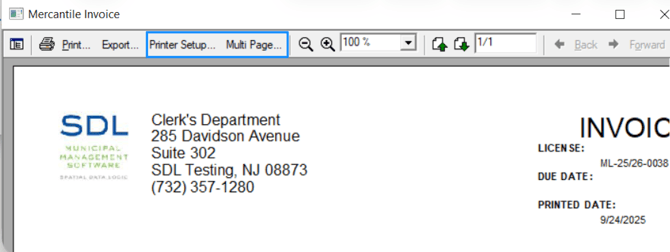
- Printer Setup button available on all Clerk and Code Enforcement reports
- Multi-Page Print capability added to all Clerk and Code Enforcement reports
- Consistent print control interface across the Clerk and Code Enforcement
modules
Code Enforcement - Invoice Address Labels Updated
Updated address labeling on Code Enforcement invoices to better reflect the
purpose of each address field.
What changed:
- Mailing address label now correctly displays the owner's address, not the
property address - "Business" address label updated to "Business / Property" to clarify its multi-purpose use
Impact: Code Enforcement invoices now display more accurate and clearer address
labels, reducing confusion about which address corresponds to the owner versus the
property, and ensuring invoices are properly addressed to property owners.