![SDL - 2025 New Logo.png]](https://help.getsdl.com/hs-fs/hubfs/SDL%20-%202025%20New%20Logo.png?height=40&name=SDL%20-%202025%20New%20Logo.png)
Improvements
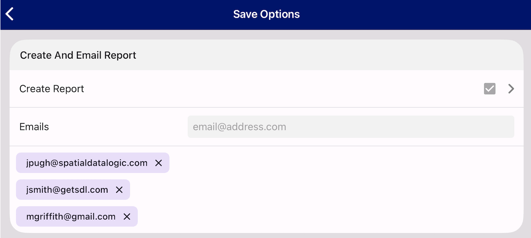
Sending Inspection Reports to Multiple Email Recipients
Inspectors can now email inspection reports to multiple recipients from the mobile
app, streamlining communication with contractors, property owners, and other
stakeholders.
What's New:
- Multi-recipient email functionality when sending inspection reports
- Flexible email entry options:
- Select from suggested email addresses
- Manually enter email addresses
- Mix both methods as needed
- Email validation to prevent invalid addresses from being added
- Updated workflow: Create report first, then add email recipients
Benefits:
- Send reports to multiple stakeholders in a single action, reducing time spent
sending duplicate reports - Built-in email validation prevents errors
Fire Prevention - Predefined Violation Location Lists
Violation locations in the Fire Prevention module can now be selected from a
predefined list, restoring functionality from Mobile 3 and improving data consistency.
What's New:
- Location picker with predefined options when adding violations
- Consistent location naming across all fire prevention inspections
- Improved data entry efficiency during field inspections
Benefits:
- Reduces manual typing and potential data entry errors
- Ensures standardized location terminology across reports
Fire Prevention - Business Name Inspection Search
Inspectors can now search for inspections by business name, streamlining the
process of locating inspections while on site.
What's New:
- "Business Name" added to the Inspection search type dropdown menu
- Improved search efficiency for field inspections
dropdown in the search bar, then enter the business name to quickly locate your
inspection.
Fire Prevention - Violation Photos
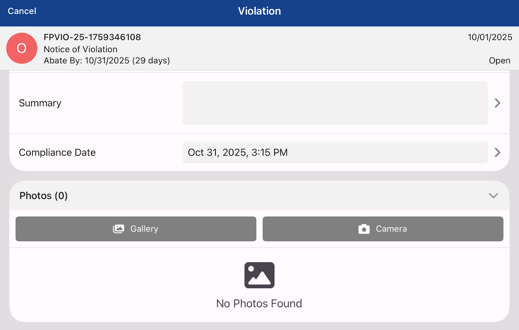
Inspectors can now add photos directly to individual violations. This enhancement
streamlines violation documentation by allowing photos to be captured and
associated with specific violations during field inspections.
What's New:
- "Add Photo" button within violation details
- Multiple photo capture options:
- Take photos using device camera
- Select existing photos from gallery
- Intuitive photo gallery with horizontal swipe navigation
- Automatic scrolling to newly added photos
Benefits:
- Photos added to violations automatically appear in inspection reports (Notice
of Violation) with the violation number and statute ID as the description, - Streamlined violation documentation workflow
- Efficient on-site photo capture and organization
Fire Prevention - Improved Date Selection for Recurring Inspections
The date selector for recurring and compliance inspections has been updated to
include year selection, making scheduling future inspections significantly easier and
eliminating the need to scroll through individual days when scheduling inspections
far into the future.
What's New:
- Enhanced date picker with separate month, day and year selections for
efficient date navigation - Streamlined scheduling workflow for recurring inspections
Benefits:
- Reduced scrolling and interaction time when setting inspection dates in the
future - More intuitive date selection experience
Quick Descriptions Data Refresh and Search Enhancement
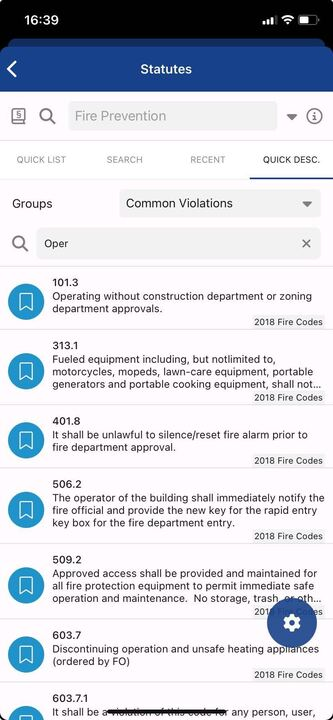
Quick Descriptions now load fresh data each session, ensuring inspectors always
have access to the most current statute information. This update also adds search
functionality to both Quick Descriptions and Quick Lists, making it easier to find
specific statutes during inspections.
What's New:
- Quick Descriptions lists refresh with latest data at the start of each session
- Search bars added to Quick Descriptions and Quick Lists
- Filter statutes by title, number, or text for faster lookup
Benefits:
- Always have access to the latest statute information
- Quickly locate specific statutes during field inspections
- Improved data accuracy and consistency across inspections
Construction - Permit Number Auto-Population
When viewing a permit and creating a new inspection, the permit is now
automatically associated without requiring inspectors to search for and re-select the
permit number.
What's New:
- Automatic permit association when creating inspections from permit details
- Eliminated redundant permit search step during inspection creation
- Streamlined workflow for scheduling inspections
Benefits:
- Faster inspection creation process
- Reduced data entry and search steps
- More intuitive workflow that matches user expectations
Bug Fixes
Failure to Send Inspection Reports
Resolved an issue where certain inspection reports failed to generate or send,
preventing inspectors from delivering reports to stakeholders.
Impact:
- Inspectors can now reliably generate and send all inspection reports
- Eliminated report failures caused by signature or photo encoding issues
- Improved system stability and report delivery success rate
Inspection Calendar Crash Fix
Resolved a crash that occurred when users selected dates in the inspection calendar
before inspection data had fully loaded.
Impact:
- Inspectors can now reliably interact with the calendar immediately after
opening the app - Eliminated crashes caused by rapid calendar navigation during app startup
- More stable calendar experience
Photo Capture Crash Fix
Resolved a crash that occurred when photos were taken using the device camera
during inspections. The app would crash with an error immediately after capturing
and attempting to use a photo.
Impact:
- Inspectors can now reliably capture photos without experiencing app crashes
- Eliminated workflow interruptions caused by camera usage
- Improved overall app stability during photo documentation
Construction - Tech Card Access Issue
Resolved an issue preventing tech card attachments from being opened in SDL
Mobile 4. Inspectors can now reliably view all tech card details and associated
attachments while on site, without needing to reference the desktop application.
Impact:
- Inspectors now have consistent access to complete tech card information in
the mobile app.
Land Use - Missing Inspection Address Fields
Resolved an issue where street addresses from Land Use inspections created in SDL
Mobile 4 would disappear when opened and saved in SDL Desktop. The addresses of
inspections created in mobile remain intact when inspections are viewed or edited in
SDL Desktop
Impact:
- Prevents loss of address information when switching between mobile and
desktop applications - Ensures consistent address data across both platforms
- Eliminates the need to re-enter addresses after editing inspections in SDL
Desktop
Non-Public Attachment Visibility
Resolved an issue where attachments marked for "Portal SDL User" visibility in
Desktop were not appearing in SDL Mobile. Inspectors can now view all attachments
they have permission to access.
Impact:
- Municipal employees and inspectors now have consistent attachment access
across Portal and Mobile - Eliminates confusion about attachment visibility settings
- Improves workflow efficiency by ensuring all relevant documents are available
in the field