![SDL - 2025 New Logo.png]](https://help.getsdl.com/hs-fs/hubfs/SDL%20-%202025%20New%20Logo.png?height=40&name=SDL%20-%202025%20New%20Logo.png)
A quick note before you get started
If you're an SDL user, you may not be familiar with GovPilot — and that's okay! SDL and GovPilot are two separate products offered under the same company umbrella. GovPilot Academy is the shared learning platform for all GovPilot and SDL users.
You may also be used to accessing your SDL training through Litmos (sometimes called the SDL Learning Portal). Litmos was the previous training platform — it's now being retired and replaced by GovPilot Academy, where all of your training content will live going forward. This guide will help you get set up and find everything you need.
Transition Information: Litmos to GovPilot Academy
What is happening to Litmos?
The Litmos learning platform is being retired. GovPilot Academy is our new learning platform, and all training content will be hosted there going forward. We appreciate your patience as we make this transition as smooth as possible.
Will I still have access to my SDL training content?
Yes, all SDL training content will remain accessible through GovPilot Academy. To ensure you have access to SDL courses, you must select "SDL" when registering (see the "Getting Started" section below).
Getting Started with GovPilot Academy
How do I register for GovPilot Academy?
To register for GovPilot Academy, follow these steps:
- Go to: academy.govpilot.com/register
- Fill out the registration form using your government-issued email address.
- During registration, you’ll see two fields related to your software platform:
- What is your primary software platform? — Select the platform you use most.
- Secondary platform (if applicable) — Select any additional platform you use.
- To access SDL training content, make sure you select SDL in either the primary or secondary platform dropdown. Once logged in, you’ll have immediate access to all available courses and resources.
🚨Please note: We recommend you register using an individual email address, not a shared or role-based address (e.g., inspector@yourtown.com), since all course progress is tied to the email used at registration. If a shared address is used, a new staff member using that same address will not be able to start fresh or have their own progress tracked independently, unless a request is made by an administrator to reset it.
I forgot my password. How do I reset it?
If you forget your password, follow the "Forgot Password?" link on the GovPilot Academy login page. You will be prompted to enter your registered email address, and a password reset link will be sent to your inbox. Be sure to check your spam or junk folder if you don’t see it within a few minutes.
Can I use my SDL login to access the Academy?
No, GovPilot Academy is a separate platform and requires its own account. When you register, you'll be prompted to create a new password. This password is specific to the Academy and is not connected to your GovPilot login credentials.
What does GovPilot Academy offer?
GovPilot Academy is the training hub for all GovPilot and SDL users. Here's what you'll find:
- On-demand courses covering features, workflows, and best practices — available anytime, at your own pace.
- SDL-specific training under a dedicated SDL Training tab, so SDL users can quickly find what's most relevant to their work.
- GovSites training for users who manage their municipality's public-facing website.
- FAQs and support content to answer common questions on the spot.
Is GovPilot Academy free?
Yes! GovPilot Academy is completely free for all GovPilot and SDL users.
Accessing Training Content
How do I find a specific training course?
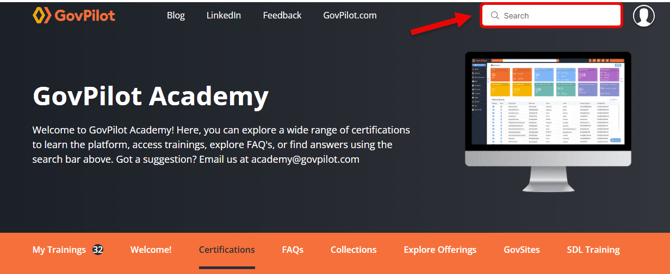
Use the search bar at the top right to find a specific training course. You can search by course title, keywords, or topics without browsing through the full catalog.
Where can I find training content related to SDL?
All SDL-specific training content is grouped under the "SDL Training" tab in the top navigation bar, or go directly to academy.govpilot.com/pages/sdl.
Where can I find training content related to GovSites?
All GovSites-specific training content is grouped under the "GovSites" tab in the top navigation bar, or go directly to academy.govpilot.com/pages/govsites.
Can I access GovPilot Academy on my mobile device?
Absolutely! GovPilot Academy is mobile-friendly. You can take trainings and access all course content directly from your smartphone or tablet — no app download required. Just visit academy.govpilot.com in your mobile browser.
Taking Courses
Do I need to complete courses in a specific order?
No, you can take courses in any order that works best for you. If you'd like a recommended sequence, refer to the training guide for your product:
Note that you'll need to be logged in to access these.
Can I pause a course and resume it later?
Yes. Your progress is saved automatically. You can stop and pick up right where you left off when you return.
Why do some courses look different from others?
Some courses may look and feel different from others in GovPilot Academy. Certain content was transferred from the previous platform in its original format, which means it preserved its original layout and design rather than being rebuilt from scratch. When taking one of these courses, keep the following in mind:
- Courses may take slightly longer to load.
- Scroll down to find and click the Next/Back buttons.
- The course menu is located in the top right corner of the screen.
- Exit the course when completed to ensure your progress is saved.
Technical and Contact
What browsers are supported?
GovPilot Academy works best with modern browsers such as Google Chrome, Mozilla Firefox, Microsoft Edge, and Safari. Make sure your browser is up to date for the best experience.
Who do I contact if I have trouble?
For platform specific issues or bugs, contact the related support team directly:
- SDL products: support@getsdl.com
- GovPilot: support@govpilot.com
- GovSites: support@govsites.com
For questions specific to GovPilot Academy, email academy@govpilot.com.
How do I submit feedback about GovPilot Academy?
We welcome your feedback! You can send comments, suggestions, or questions directly to us at academy@govpilot.com.