![SDL - 2025 New Logo.png]](https://help.getsdl.com/hs-fs/hubfs/SDL%20-%202025%20New%20Logo.png?height=40&name=SDL%20-%202025%20New%20Logo.png)
Fines in Fire Prevention are assigned per violation rather than as a single grand total — this gives more accurate tracking, but can get cumbersome when a lot of violations pile up in one inspection cycle. The Fine Manager form helps you handle fines for multiple violations at once instead of editing them one by one.
Accessing the Fine Manager
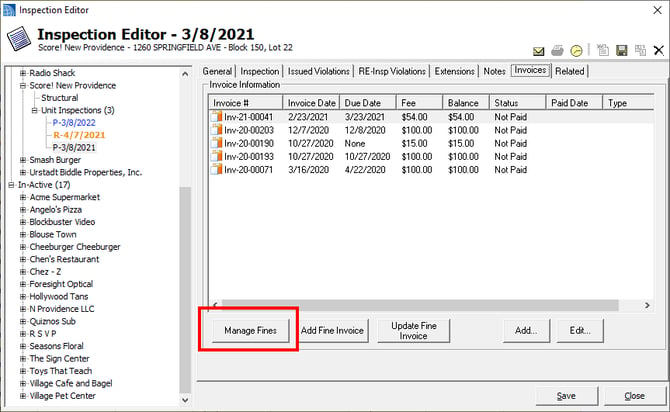
- From the Inspection Editor, go to either the RE-Insp Violations tab or the Invoices tab.
- Click the Manage Fines button.
Using the Fine Manager Form
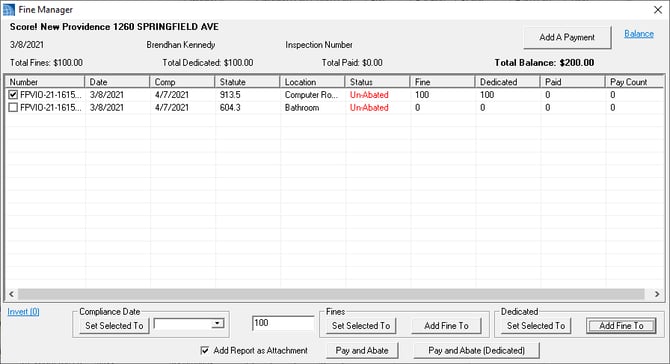
- You'll see a list of all violations tied to the inspection, along with their status and current fine amounts.
- Check off the violations you want to act on. Use the Invert link if you want to quickly select all violations at once.
- If a violation doesn't have a fine yet, use the Add Fine To button. This adds a new fine based on the amount entered in the middle text box (e.g., 100).
- To adjust fines on violations that already have one, use the Set Selected To buttons to quickly raise or lower them.
- Note: If you also want to charge a dedicated amount, you'll need to click both the Fines section and the Dedicated section separately.
Applying Payments
- If you're not using the Multi Fee/Violation Invoicing option, you can use the Payment button in the top right to add a payment to each violation for its respective amount — saving you from doing it one at a time.
- Only use this when the payment covers the full total of all violations. It's not designed for partial payments.