![SDL - 2025 New Logo.png]](https://help.getsdl.com/hs-fs/hubfs/SDL%20-%202025%20New%20Logo.png?height=40&name=SDL%20-%202025%20New%20Logo.png)
Construction Permit Application - Multi Fees
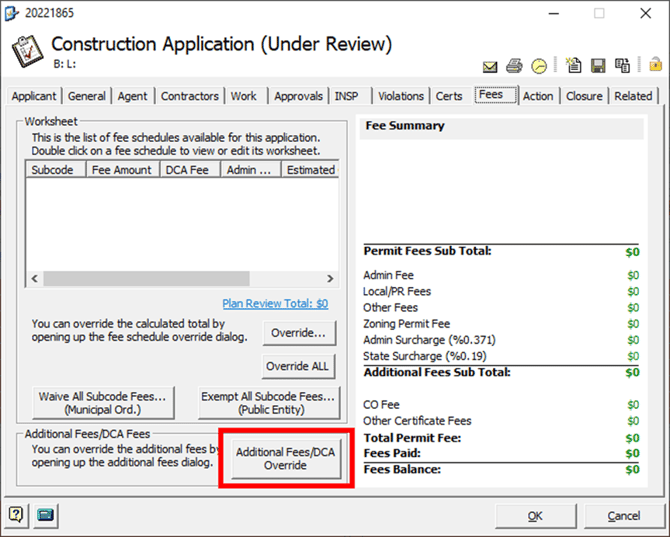
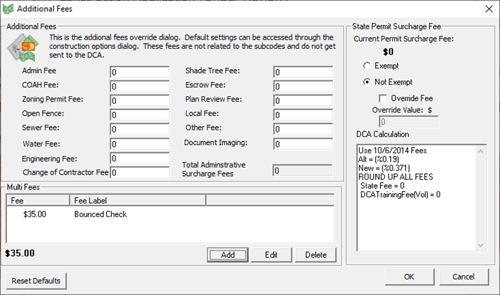
In a recent update we added Multi Fees to the Construction Application Additional Fees section. This will allow users to add fees and assign them to fee types for any additional process you may need to track.
Please note the label change on the highlighted button.
Multi Fee Control
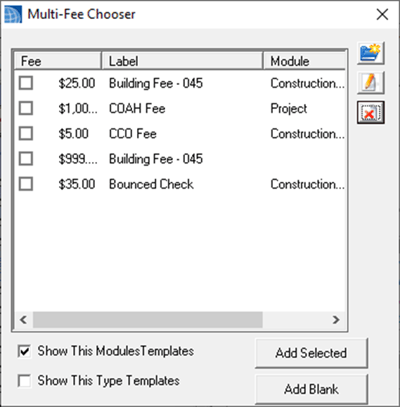
- Using our Multi Fee Control (Multi Fee Chooser - Shown Below):
- you can add templates for commonly used fees
- you can also add as many additional fees as needed
- These fees will transfer over to the Application Bill for invoicing or payment requests.
- All Multi Fees will show on Permits and Activity reports as “Other Fees”.
Please note this is only available in SDL Desktop and not editable in SDL Online.