![SDL - 2025 New Logo.png]](https://help.getsdl.com/hs-fs/hubfs/SDL%20-%202025%20New%20Logo.png?height=40&name=SDL%20-%202025%20New%20Logo.png)
Electronic Signature Process Overview:
We've received client confirmation that the DCA is now allowing electronic signatures for UCC documents. In response, we've developed a combination of permissions and pins that can be used to apply digital signatures in SDL Desktop.
In order to apply a digital signature, the user must have the correct permissions. After the sign button is pressed, the user will also need to enter a signature pin to verify the process. Once applied, the signature will appear on any subsequent prints. Additionally, the history of who applied the signature, whos pin was used and the date/time of signature will be logged for tracking purposes.
It's important to note that we do not recommend sharing pins. For instances where a TA has permission to sign on behalf of another staff member, we recommend giving the TA their own signature image with the appropriate wording.
So far, we have applied these updates for UCC Certificates and UCC Permits, but we will be expanding this capability to other processes shortly.
How To Get Started?
To use this feature you must assign permissions, set up your signature pins, and provide SDL with a set of signatures and initials for all authorized staff members.
Assign Permissions: The permissions include: CanSignCertificate, CanSignPermit, CanSignTechBuilding, CanSignTechElectrical, CanSignTechPlumbing, CanSignTech Mechanical, CanSignTechElevator
Set Up Signature Pins: Signature PINS can be added in the Desktop Admin or if you are logged in you can change your PIN through the file menu.
Step 1: In the File drop-down menu, select Change Signature PIN
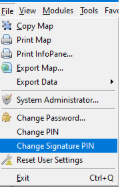
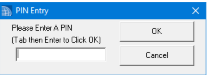
Step 2: A pop-up window will appear. Enter the PIN you would like to associate with your signature.
Establish Electronic Signatures
To establish electronic signatures, we will need your Construction Official, Subcode Officials, and Inspectors to provide a copy of their signatures and initials. Each official will need to complete the form found at: https://www.cognitoforms.com/SpatialDataLogic/DesktopSignatureForm. Once this form is filled out and comlpeted, this will automatically send a link over to our support team and we will create a signature file and attach it to the respective user's account for you.