In order to request an inspection, you will need to have an existing permit application. If you do not have one yet, please view these instructions for information on how to submit a permit application.
Creating an Inspection Request
From within your town's Portal, click on the “Requests” link in the top menu. In the new page, find the one you are looking for and click on it.
1. You can search for it, or look in the appropriate place (planning and building section for
inspections). The inspection request will be the name of your permit application with the word Inspection following it and will have a calendar icon, as seen below:
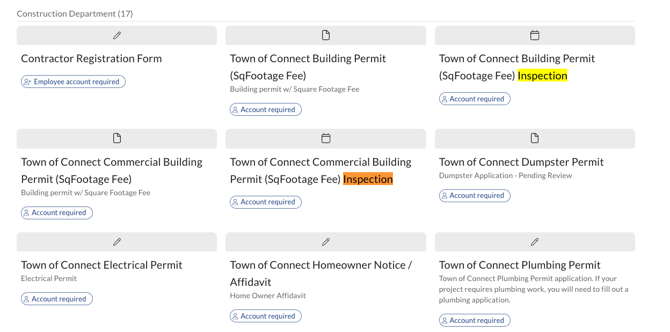
Fill out the inspection request that pops up:
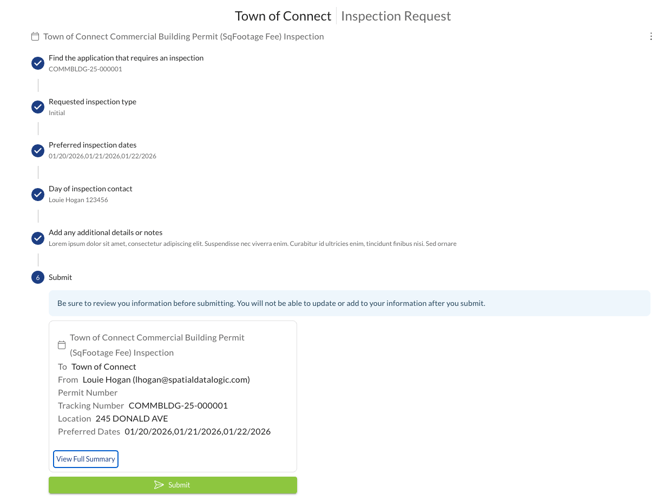
1. Use the tracking number or address.
2. Choose the inspection type.
3. Pick an available date.
4. Fill out the contact info of the person responsible for the inspection.
5. Add any notes and if the inspection is needed for a specific time.
6. Submit the request.
7. It will then be approved or denied.
Once submitted you will get an email and it will pull up the below page. There is a link on that page that shows your request and the status.