![SDL - 2025 New Logo.png]](https://help.getsdl.com/hs-fs/hubfs/SDL%20-%202025%20New%20Logo.png?height=40&name=SDL%20-%202025%20New%20Logo.png)
SDL Portal Update
Building Permits
Building Permits on the portal have had another upgrade with new features, better configuration options and an improved UI. Behind the scenes, we have moved management of portal permit templates from the hybrid desktop/portal configuration to having templates fully created, configured and managed in the portal’s town admin request pages. You can still create templates in the desktop for desktop use, but permit templates on the portal will need to be created and managed on the portal town admin pages only. Any existing templates will be imported to the new system and existing desktop settings such as template names, associated subcodes, and subcode default values will still be available for configuration online.
Permit Applications
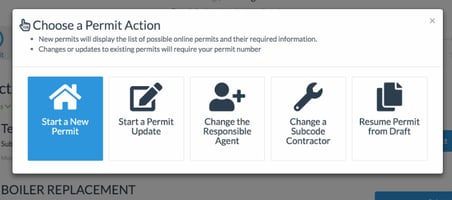
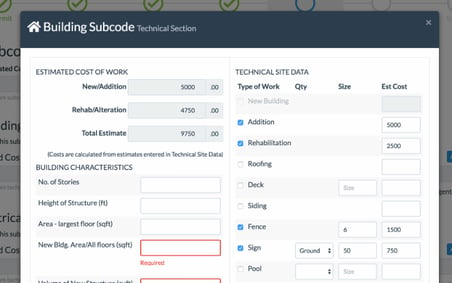
For permit applicants, Building Permit requests will have several new options aside from the standard New Permit request. Permit Updates, Contractor Change and Responsible Agent Change requests will now be available as options within the permit request process. Permit applicants should also experience a better online process with improved messaging, short cut selections for contractors, and the ability to opt out of subcodes that may not apply to their application. We have also updated the required fields and logic within the request to better align with what the desktop expects to help streamline the process of taking permit applications online.
Complaint Requests
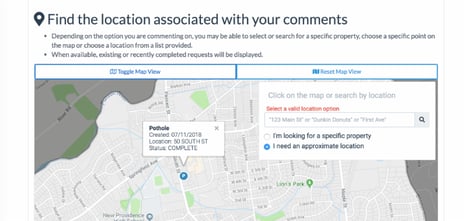
Complaint Requests saw a couple of small but useful enhancements as well in this release. Town admins will now be able to select what location types should be available for each complaint template - property, point on the map or no location at all. In addition, a new location type will be available - a drop down list populated with options configured per template. Add a list of parks, specific buildings, or anything else that makes sense to the complaint topic. These values will come down to the desktop as a simple text location value. Lastly, on a per template basis, the ability to display existing complaints on the request map is available. The map display adheres to the same configuration and permissions as the complaint topic map and by default will only show complaints matching that template type from the past 30 days.
Requests Admin Pages
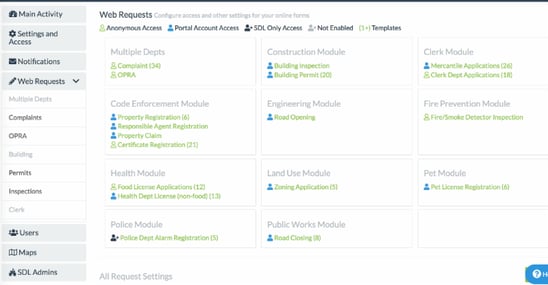
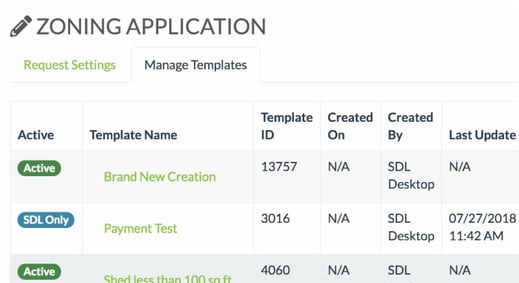
Finally, town admins will notice that we have made changes to how the requests admin pages work. The main requests page has an improved format and will navigate you to individual pages for each request type. Request types will need to be saved individually rather than making changes to several types at once. Similarly, any request templates will also need to be saved individually and will no longer allow for updates to several at one time. The new format should allow for faster load times, quicker save times and reduce the possibility of making accidental changes. All request templates will also have a new access setting - SDL Only - which will allow for templates to be configured and tested before opening them up to the public.
New Features
- Permit Request Town Admin Updates
- Permit request templates are now completely managed and created in the portal town admin interface.
- Ability to include/exclude subcodes
- Ability to add icon or image to ui display
- Ability to update template name
- Ability to add default options for each template subcode
- All the existing settings that you have available in the portal
- Any existing desktop created templates will be imported to the new process.
- Permit Request UI Updates
- Added ‘Permit Update’ only option
- Added ‘Change Contractor’ only option
- Added ‘Change Agent’ only option
- Updated Required fields to better align with desktop
- Added ability for end user to include/exclude available subcodes in their application
- Added Use Responsible Agent as Contractor option
- Added additional logic to subcode tech cards to better align with desktop
- Permit Request tech card ‘Other’ options and ‘Construction Class’ options created from town desktop configuration
- General updates and fixes to UI for better usability
- Complaint Request Updates
- Added ability for town admin to configure location types to be displayed for each template
- Added new location type - ‘list’ which allows for a configured list of location options per template that is displayed in a drop down.
- Added town admin configuration to display existing complaints on the request map i.e. show existing Pothole complaints from past 30 days on map when user has selected the Pothole request template
- General updates to UI for better usability
- Inspection Request - permit search widget updated for better usability
- User location logins list added to user account page. In addition to the email notifications sent when a user logs in from a new location/browser
- Town Admin Updates
- Improved messaging for email log searches. There is an unresolved issue with email searches inconsistently failing. UI will include updated messaging when this issue results in no search results.
- Updated Web Requests page(s)
- Main requests page UI updates for better visibility on current request access states
- Individual request settings are now managed on individual pages for better usability - NOTE: you will now need to go to each request type to make updates and save settings
- Request template settings are now managed individually. NOTE: you will now need to select, update and save each template type when makings changes
- Request templates can now be enabled for SDL Users only on a per template basis
Bug Fixes
- 500 error with permit advanced search using previous quarter time frame fixed
- Property Page Last Sale Date MOD IV data field fixed
- Error for non-image attachments in email fixed
- Road closing map issue causing some line clicks to not register fixed
- All requests - additional fix to prevent user from using back button to start a new request
Misc Changes and Improvements
- All requests will display as ‘Accepted’ rather than ‘Complete’ when the request is completed for better clarity for the end users
- All requests will only trigger notifications on create and complete of the request (in addition to notifications forced by a desktop user for more information or otherwise)
- Permit emails/page - permits in ‘Certificate … Issued’ status will no longer trigger an email and will be considered as “Issued” and not “Complete”
- Updates to permit and inspection email footers
- All emails have an updated format for the town name <town, state (county)>
- Updated validation for reset password page to match create validation
- Updated validation to require email for forgot password and activation resend pages