![SDL - 2025 New Logo.png]](https://help.getsdl.com/hs-fs/hubfs/SDL%20-%202025%20New%20Logo.png?height=40&name=SDL%20-%202025%20New%20Logo.png)
Fire Prevention Update 20.3.37
Over the past several weeks we have been continuing to work on adding new features and improving workflow for our Fire Prevention users. In addition to the number of updates that went out last month, we have some additional improvements for both SDL Desktop and SDL Portal fire prevention functionality. Below you will see all requests now available to turn on in the SDL Portal.
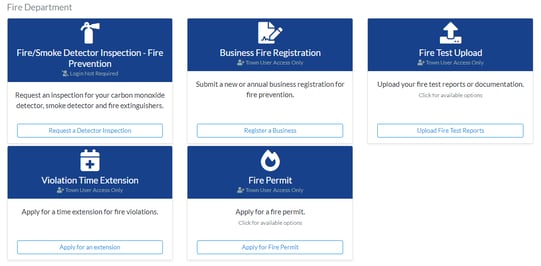 Please be aware that titles and instructions for each Portal request can be customized by an authorized SDL Portal Administrator. To do so, go to "Town Admin", "Web Requests" and select the request you are looking to edit.
New Business Registration: SDL Portal Request
We have added a new Portal request to allow business owners to register new businesses. This will allow you to capture most of the pertinent information about the business, and when processed will quickly add the information to a new unit on a new or existing property. As with most SDL Portal Requests, you can require additional attachments be uploaded with the submission. We are currently not allowing agents to add the specific type of LHU or NLHU, as we felt they would not fill this in competently. We will review this as a potential addition as towns begin to use this request and provide feedback. Please review and let us know of any other changes you feel would help.
.png?width=515&height=392&name=Picture1%20(1).png)
.png?width=509&height=381&name=Picture2%20(1).png)
Fire Permit: SDL Portal Request
As requested, citizens can now apply for a Fire Permit through the SDL Portal. This request can be used for Standalone Permits, Festival Permits or as part of an existing business unit. This request will list all state and local permit types that you have added to SDL Desktop. You can turn off any of these individual types if you prefer to limit which permits citizens can apply for. If you have Municipay enabled, payments can be accepted at time of application.
.png?width=624&height=360&name=Picture4%20(1).png)
Fire Violation Extension: SDL Portal Request
Another new request for SDL Portal will allow agents to apply for a time extension for violations. We kept this request simple and let the user select a business and enter the date of the violation. Town users would then use SDL Desktop to choose which inspection they want to assign the extension too. All other fields will then flow directly into the SDL Desktop extension application, for you to choose which violations to apply it to then approve or deny the application.
.png?width=624&height=480&name=Picture5%20(1).png)
Fire Document Upload: SDL Portal Request
As a reminder, in the last update we included an SDL Portal request to allow for agents to upload documentation for a specific business, ie sprinkler or fire alarm tests. When processed, these documents will be added as attachments to that business. This update allows desktop users to double click the listed attachment to review the documents before adding them to a business.
Invoice Payment Search: SDL Portal
The next SDL Portal update will also allow you to add a statement to an invoice, directing citizens to SDL Portal to complete their payments online. The payment would then flow to the desktop, just like any other Payment request, and display on your home page for processing. This will allow you to continue to mail invoices, but give the agents an option to pay by credit card. This will especially help collect timely payments from individuals without email addresses, and give them the ability to see the payment request options. This feature can be added per invoice, or when you mass create invoices from the datagrid. Municipay is required for this feature.
.png?width=434&height=511&name=Picture6%20(1).png)
.png?width=548&height=211&name=Picture7%20(1).png)
Violation Fine History
Please call support to turn on the Violation Fine History datagrid. Every fine save will write a record to the history table to keep track of any changes. As such, there is no longer a need to override fines, simply update the fine to the new value.
Reminder: New Activity Reporting
We are continuing to update the new activity reporting manager. This update includes Violations with fines, Fines Paid and Violations with balances remaining. Please note, we added a new Is Paid tag to fines and will need to fill in this value for historical violations. Please call support if you would like us to run this. The activity reports are meant to be your one-stop-shop for monies requested and paid, inspections completed and scheduled and violations issued and abated. Please let us know how we can improve on this moving forward.
.png?width=537&height=283&name=Picture8%20(1).png)