![SDL - 2025 New Logo.png]](https://help.getsdl.com/hs-fs/hubfs/SDL%20-%202025%20New%20Logo.png?height=40&name=SDL%20-%202025%20New%20Logo.png)
SDL Desktop - 20.3
Workflow 20.3
- Added - Help Center Link to Help Menu
- Added - BLQ/Location to OPRA email body
- Added - Text look up link to Text Viewer
- Added - BLQ to Counter Payment
- Added - Counter Payment to Info Pane, Property Item section
- Added - Do NOT show CC payments to Fee Item Reports
- Added - COAH to Zoning Info pane section
- Added - Permission to limit custodians in the OPRA Application (CanNotBeAssignedOPRAApp)
- Added - Email button to OPRA assignment
- Added - Permission to limit Assigned user in an OPRA Assignment (CanNotBeAssignedOPRAAssign)
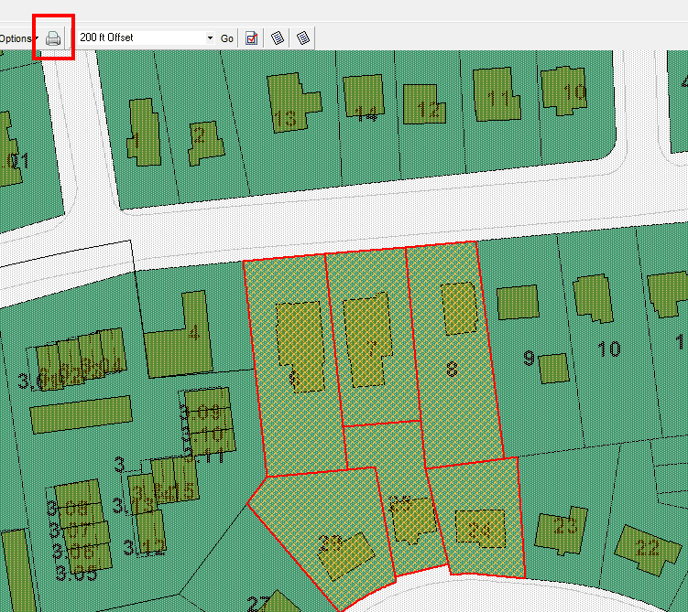
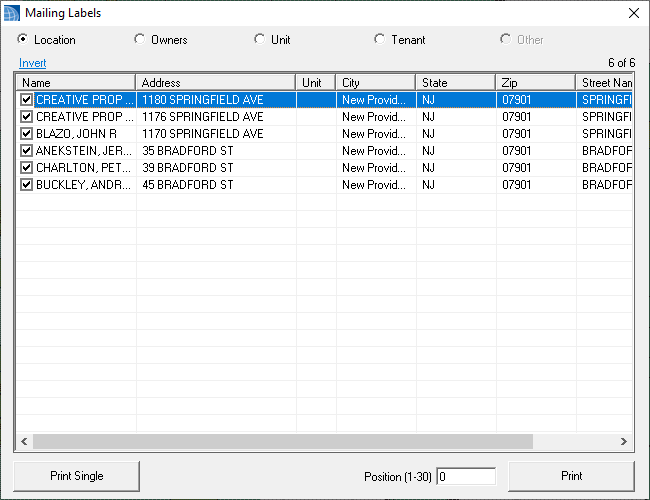
- Added - Location/Owner/Tenant mailing labels to map tab
- Added - Ability to print Owner Lcoation Mailing labels to Project properties
- Added - Mailing labels to Project Applicant and Owner controls
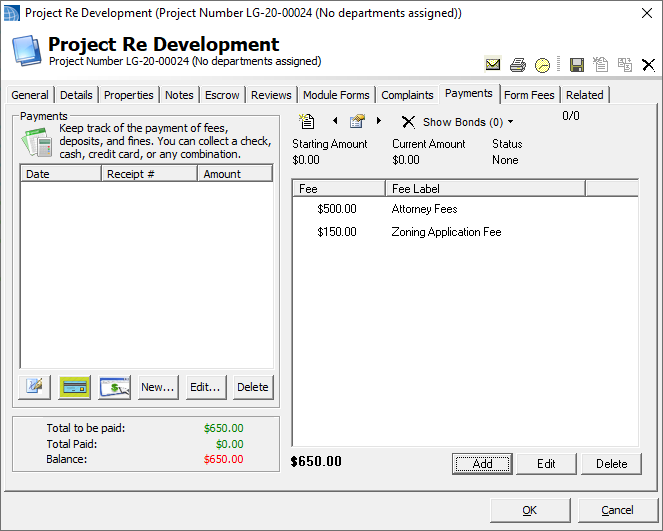
- Added - Multi fees to projects to allow for project fees
- Updated - Debug file will now include logged in user
- Updated - PINs entered in admin will now check existing records
- Updated - User prompt when online payment fails to save
- Updated - New Complaint Types will now include the ID in the default name; this has been done in order to keep it unique
- Updated - Text Viewer will now save the font per session
- Updated - COAH payment balance
- Updated - Get Inspector SignatureID by inspector ID
- Updated - New Deductions will tab to the contact name
- Updated - Finishing OPRA Assignment will no longer prompt to update Portal Request
- Updated - Users without CanViewOPRARequestor permission will no longer be able to access the OPRA web request form the assignment
- Fixed - Issue with BLQ search field resetting after search on DGC
- Fixed - Issue with Inspection can inspect counts using 2 days
- Fixed - Issue with re-sending Online Payments emails
- Fixed - Issue with Escrow Deposit is Deposited not saving
- Fixed - Issue with Payment dates not filling in on some CC payments
- Fixed - Issue with owner and applicant address in Project reviews
- Fixed - Balance COAH DGC column
- Fixed - Issue with Interest payments not showing on escrow activity report
- Fixed - Label issue on Credit card report
- Fixed - Issue on Project review templates not showing all
Mailing Labels
Project Properties
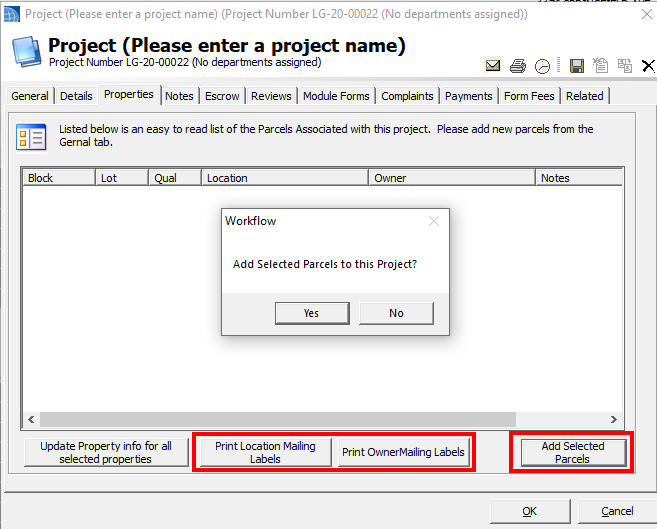
We have added the ability to add selected parcels to a project. This should greatly speed up your creation of projects for road projects, development, regional issues or even just to hold commonly needed addresses for Mailings. Simply select the properties you want to add on the map, then on the Properties tab click "Add Selected Properties". You will be prompted to add the owners to the project as well. No duplicate BLQs will be added.
We have also added the ability to print the project properties from this tab. Note, this prints the current owner found in the tax data. If you want to use the stored owner's and applicant's information on the project, you can now do that from the general tab.
Project Multi Fees
As part of the Project update, we have added the ability to add Multiple Fees to a project. This is meant for additional fees that come up that don't have another application to hold them, but it can be used for anything. They tie to your SDL Fee Types and show on the fee item reports. You can also still add Module Applications and process those fess here.
Text Viewer
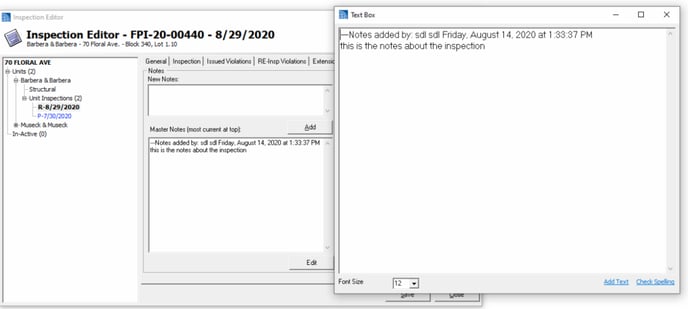
Although added some time ago, we have recently added the functionality to open a larger text viewer in more places. Double Clicking the text box will open a larger viewer that can be resized. You can also change the font, use spell check and add saved text.
Code Enforcement 20.3
- Added - Processing of Payments on Certificate Portal Request
- Added - Inspector Signature Option to Inspection and Violation reports
- Added - Processing of Inspection Dates on Smoke Detector Portal Request
- Fixed - Issue with payment comment not filling in on online payment
- Fixed - Issue with request payment
Construction 20.3
- Added - Void Check box to Violation form
- Added - Use Signature option
- Added - Inspection initials to Electrical Tech Card
- Added - PR Plans/Under-slab Sign-off to Electrical tech card
- Added - Ongoing Registration payments to Payments DGC
- Added - Email Certificate button
- Added - Documents Required boolean to Construction permit and DGC
- Added - Task to update Application Statuses and Tech Card Signatures
- Updated - Request to use rolling notes for additional comments
- Updated - Lengthened BLQ labels on Order to terminate
- Updated - Centered Landscape Certificate Title
- Updated - Activity Report to show Variations Payments based on payment date not Date variation was received
- Fixed - Issue with Work Description label on certificate
- Fixed - Issue with activity log report not showing override fees
- Fixed - Issue when prompted to send certificate email
Construction Signatures
While construction signatures have been available for a couple months, we are now able to make all users aware. We recently received approval from the state to allow for digital signatures to UCC documentation. We have added permissions and user PINs to allow COs and SCOs to add their signature digitally to Permits, Tech Cards and Certificates. In the recent update we also added the ability to add inspector initials to the tech card, based on the inspection types. We have included a couple of guides to help you get setup; please call support if you have any questions.
Electronic Signatures - UCC Documents (Overview & Getting Started)
Electronic Signatures - Applying to UCC Documents
Fire Prevention 20.3
- Added - Processing Document Upload Portal Request
- Added - Knox box field to inspection report Alt
- Added - Unit Type label to Detector Alternate Certificate
- Added - Email Certificate Button to Detector Inspection Form
- Added - Manage Festival permit Tracking number button to options
- Added - Processing of Payments on Smoke Detector Portal Request
- Added - Processing of Inspection Dates on Smoke Detector Portal Request
- Added - Add Payment option to Fine Management form
- Added - Tenant name label to Smoke certificate
- Added - Order by Tracking Number to Inspection Violations
- Added - Inspection number to the Pay and Abate report for a reference number
- Updated - Fire Investigation Labels
- Updated - Occupancy Certificate to include full department address
- Updated - Inspection Emails will now use the show Comments on report for new emails
- Updated - Zero permit Fees will be labeled as waived
- Updated - Appeal right report will now add as attachment if marked
- Updated - Imminent Hazard Appeals Rights wording to use NJSA rather than NJAC
- Updated - Units Next inspection will exclude completed inspections
- Updated - Room occupancy print from the unit editor will now add as attachment
- Updated - When adding Multi Violations, they should check for an existing re-inspection
- Updated - Users can now print the Notice to Pay with initial violations included
- Updated - Units Registration Number label will now be used on the Room Occupancy Report
- Updated - Permit tab will now show lost inspection no last periodic
- Fixed - Issue with Inspection completed not checking on detector request
- Fixed - Issue with Total balance on Fine Manager Form
- Fixed - Issue with bad label on Inspection Satisfactory
Fire Prevention: Fine Management
Health Pro 20.3
- Added - Option to update Sewer Permits Owners
- Updated - Food Application Tab Order
- Updated - Food Licenses DGC will now use the Application Is Exempt field
- Fixed - Issue with sewer permit print out
Land Use 20.3
- Added - Option to use decision date on comparison report
- Added - Option to print zoning summaries by decision date
- Added - Incomplete to Zoning board hearing form
- Added - Work description to denial letter
- Updated - Comparison report to use Work Label as an option
- Updated - Permits will now add Zoning Officer notes if Add Additional is checked
- Updated - Changed default letter wording to say review process instead of denial process
- Fixed - Zoning application notes report
- Fixed - Issue of shed not being in work label
Pet Licensing 20.3
- Fixed - Issue with Portal Payment
- Fixed - Check Number label on license
Police 20.3
- Fixed - Auto Attach on registration print out
Utilities 20.3
- Added - Sort to SR details and Work order reports
- Fixed - Issue with Creating new Service Requests