![SDL - 2025 New Logo.png]](https://help.getsdl.com/hs-fs/hubfs/SDL%20-%202025%20New%20Logo.png?height=40&name=SDL%20-%202025%20New%20Logo.png)
SDL Desktop - 21.3
- Added - Parcel warning check to Complaint form
- Added - Parcel warning check to COAH Form
- Added - Multi Fees to COAH
- Added - Payments to Bond Form
- Added - Attachments to Bond Form
- Added - Project Link to Bonds Form
- Added - Rolling Notes to Bonds Form
- Added - New COAH fee calculation option, based on equalized amount
- Added - CanNOTManageMultiFees for users that should not be able to edit fee amounts
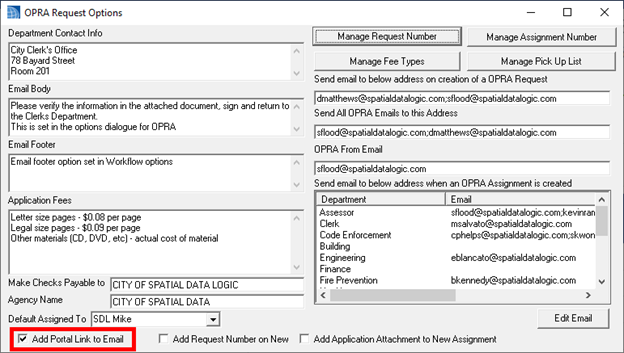
- Added - User defined report to OPRA Application
- Added - Clone user button to User manager in users Datagrid
- Added - User Defined reports to Complaints, Projects, Escrow, COAH, OPRA forms
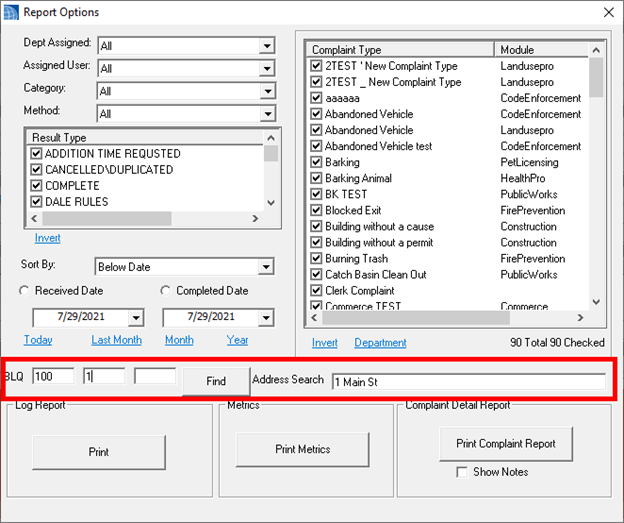
- Added - Option to Complaint Report Manager to filter by BLQ or Address
- Updated - New Multi Assignments for OPRA will not auto load User list
- Updated - Moved all COAH permissions to GeoLogic and added new permissions to the COAH form
- Updated - Moved type column on home page request section
- Updated - Filters will no longer be reset when importing Datagrids
- Updated - Decreased load time for new OPRA Assignments and multi Assignments
- Fixed - Issue with Online Payment settings not saving
- Fixed - Issue with Swipe payments on Hosted
- Fixed - Issue creating new Parcel Aliases from the Datagrid
- Fixed - Issue with Attachments saving when the BLQ had bad characters
- Fixed - Issue with SDL Email settings getting reset in Admin
- Fixed - Label issue on fee item account report
User Defined Reports
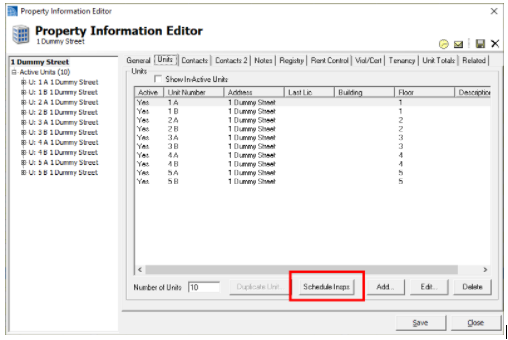
Many towns actively inspect all of their Rental Units yearly, bi-annually or do the 5 Year inspection for the state. This update includes a way to add a Certificate with an Inspection for all units on a property or multiple properties from the property data grid. On the Property Units Tab, you will see a new button called "Schedule Insps".
We know many towns have several properties with multiple buildings and dozens to hundreds of units. Mass Scheduling these inspections allow your inspectors to have a separate inspection per unit in case certain units fail while others pass and will allow you to follow the normal process of reinspections/violations for each unit.
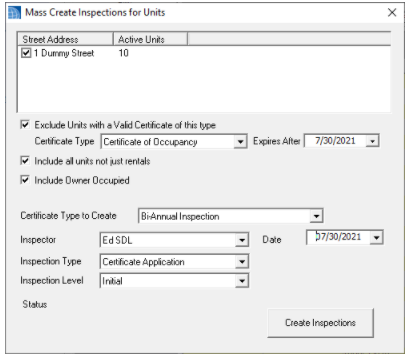
There are several options for this form with the ultimate goal of adding a certificate on each unit with an inspection on the date that was selected in the settings.
Notes:
- You do have the ability to exclude units with a valid certificate. If you do not need to do an inspection because of a change in tenancy, the "Exclude Units with a valid Certificate" option can be used.
- Generally, this inspection is paid for by the yearly Property Registration Fee, but let us know if you need an option to add fees per certificate.
- Fixed - Issue with Owner change not updating Portal property
Clerk - 21.3
- Added - Email Invoice option to Mercantile License
- Added - Deactivate businesses to mercantile Datagrid
Code Enforcement - 21.3
- Added - New expiration option: One year from Application
- Added - Ability to email Landlords
- Added - RE Street Address Option to Properties Mailing Labels
- Added - Violations to Property Registries
- Added - Status label to Registry Application and licenses
- Added - Ability to mass schedule Certificates and inspections for all units on a property
- Added - BLQ and address filter to Inspection and Violation log report options
- Updated - Inspection Checklist report check box labels can now be edited by adding a slash / to the header of a checklist
- Fixed - Issue with Properties DGC Mailing Labels
- Fixed - Issue with print invoices from Property Registry Datagrid
Construction - 21.3
- Added - Time field to Plan Review dates to help sort for submittals on the same day
- Added - Option for Projects Log Report
- Added - Description of work Comments to Property search window
- Added - Work description comments to final notice letter
- Updated - Adjusted Plan Review status report to include permit notes
- Updated - Permit Email Report button will now prompt to add additional Email addresses
- Fixed - Issue with certificate Fee type not loading
- Fixed - Issue on Ongoing Daily Bank
- Fixed - Issue with Owner Email/Cell phone not filling in on Permit Requests
- Fixed - Issue with Permit request not getting reset to submitted when cancelling a new Application
- Fixed - Issue with unsinging Tech Cards
- Fixed - Issue with Receipt town label on violation payment
Fire Prevention - 21.3
- Added - Collect by label to Fire Investigation report
- Added - Text builder to units editor for descriptions
- Added - Fine History Button to Violation form
- Fixed - Issue with Fine warning on Unit header
Health - 21.3
- Added - Pool Late fee
- Updated - Food and general will now prompt user to add as attachment when printing license
- Fixed - Issue with Logo on 2 part license
Land Use - 21.3
- Added - RTf reports to zoning applications
- Added - Option to add RTF reports as an attachment
- Added - RTF Options
- Added - Action date to Zoning Boards DGC
- Added - CanNotAdjustFee permission to not allow a user to change a fee just add the set types
- Fixed - Issue with templates using saved application date
- Fixed - Issue with Boards RTF reports
Utility - 21.3
- Added - Owner email to Generic Review
- Added - Project link to Service Request simple form
- Added - Project option to Service Request forms
- Added - Option to add Inspection Checklist report as an attachment
- Added - Option to Parks Form checklist report to add as attachment
- Updated - SR Work orders report to have a larger field for the repair code
- Updated - Pass and Fail on Inspection will prompt to complete the inspection now
- Fixed - Issue with Copying SR attachments when creating an Inspection from the SR
- Fixed - Issue with Service Request Simple form filling in location name value on link
- Fixed - Issue with date created on short SR form
- Fixed - Issue with assigned to department on Service request templates