![SDL - 2025 New Logo.png]](https://help.getsdl.com/hs-fs/hubfs/SDL%20-%202025%20New%20Logo.png?height=40&name=SDL%20-%202025%20New%20Logo.png)
SDL Desktop - 20.2.7
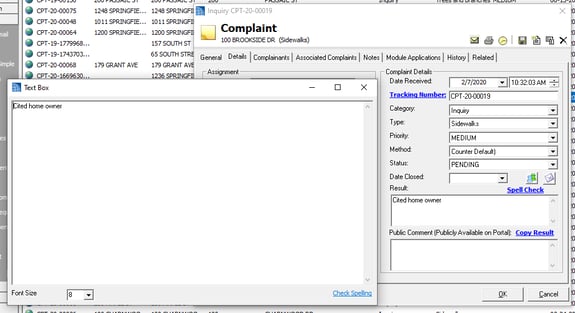
- Added - Text box viewer to prior approval form
- Added - Review type to project review
- Added - Check # to escrow deposit, for the reports
- Added - Link to help use new LogMeIn
- Added - Option to add Inspector signatures
- Added - Local Tracking Number field to Escrow Account, Activity DGC and Reports
- Added - OPRA History DGC
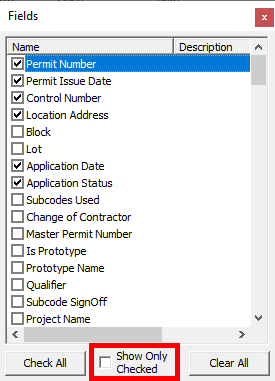
- Added - Check box to only show selected fields in the the DGC field chooser
- Added - Invoice Receipt to Payment form: this will read from the payment receipt info
- Added - Spell Check to Complaint Form
- Added - Option for a department "From Address": emails sent out will use this address instead of the user's
- Added - Simple Plans Download option for Requests
- Added - Signature PIN to User's account
- Updated - Option to add OPRA tracking, as well as options to auto add tracking numbers
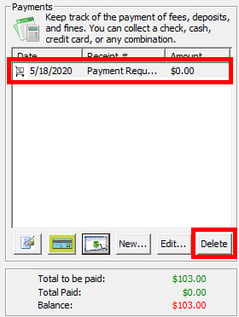
- Added - Permission to allow users to delete unprocessed Online Payment Requests: CanDeleteCCRequest
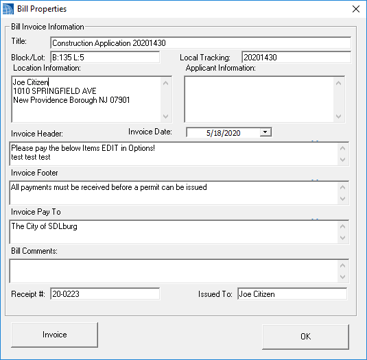
- Added - Invoice report Button to Payments Control: holding shift will allow you to edit Bill properties
- Updated - Additional blocked times
- Updated - OPRA Map Link to work on servers
- Updated - When denying an OPRA, all assignments will now be updated
- Updated - Complaint Completed email will now include public notes, rather than complaint notes
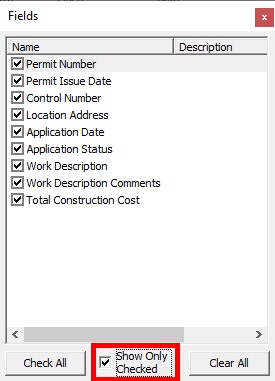
- Updated - "Show Only Visible Fields" will now also affect the search fields drop-down
- Updated - Attachments DGC
- Updated - Escrow Activity Report type will now show interest as an option for deposits
- Fixed - "None" setting on after days on DGC calendar
- Fixed - Issue with "Inspector Can Inspect" count
- Fixed - Disabled body on sent email, so users can scroll
- Fixed - Negative totals on reports
- Fixed - Issue with Online payment fee labels duplicating
- Fixed - Issue of single digit decimal amount breaking online payments
- Fixed - Issue of request not getting marked "Dirty" when a history is written
- Fixed - Issue of Contractor Email on Escrow account not copying
- Fixed - Project Reports issue with statuses
- Fixed - Issue of deleted actions showing on the All Escrow Activity Report
- Fixed - BLQ info on Escrow email body
- Fixed - Issue of having to hit save for the funds letter to fill in
LogMeIn Update
For more information and to download the latest LogMeIn update, please visit the link provided below.
LogMeIn Update
Clerk/Commerce - 20.2
- Added - Option to reset Mercantile application fees to types
- Added - Inspection Count field to Games form
- Added - Option for Date Override label on game certificate
- Added - Members telephone to Games Certificate
- Updated - When updating game type, user will now be prompted to update dates game types
- Updated - Games Roster Report
- Updated - Renewing a parking permit will now use the Parking lots expiration date or 1 year after the selected
- Fixed - Issue with Hours not calculating on special date copy
Code Enforcement - 20.2
- Added - Delete permission to Certificate inspections
- Added - Notice Label option to Inspection and Violation
- Added - Address field to standalone inspections
- Added - Professional look-up to Property Editor Manager
- Added - Status label to violations DGC
- Added - Infraction Type List to Notice of Violation Report options, in order to adjust report header
- Added - Notice date field to Violation form
- Added - Send renewal email DGC Option to owner, certificates and licenses
- Added - Seal to base Registry Certificate
- Added - Professional lookup to tenant on Certificate Application
- Added - Link to Property Manager from Inspection
- Added - Numeric Street Number field to Units
- Added - Street Name and Number fields to Inspection DGC
- Added - Link to get Owner info on Inspection: this will pull from the Property Editor or Registry, depending on where the inspection was started
- Added - Prompt to update Street Address when user moves a unit
- Added - Fee and payment to MVD on units rent control
- Added - Pick-up drop down to certificates
- Added - Statute Search to Multi-Violation form: new inspection will now check for Property Warnings
- Updated - Unit section on Info Pane
- Updated - Adjusted Inspection Notice, Summary and Violation Notice so Owner fields can show in a windowed envelope
- Updated - If No Name is a tenant, DOB will not print on certificate
- Fixed - Home/Work Contact saving issue
- Fixed - Certificate list view on Unit Editor
Construction - 20.2
- Added - Agent email to send to by default on inspections
- Added - Option to base adding surcharge on whole state fee
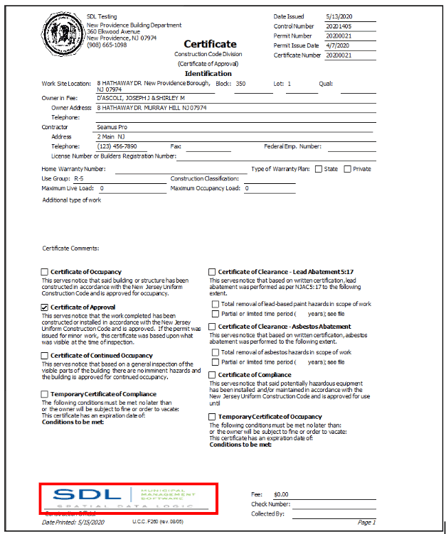
- Added - Options to add Digital Signature to Certificates, Permits and Tech Cards
- Fixed - Issue with certificate if Contractor has multiple licenses
- Fixed - Issue with Comparison Report
New - Applying Electronic Signatures to UCC Documents
Information regarding our latest developments on electronic signatures can be found in our Help Center. Please review our two articles for more information:
Electronic Signatures - UCC Documents (Overview & Getting Started)
Electronic Signatures - App`lying to UCC Documents
Engineering - 20.2
- Added - Work type field to Road Opening DGC
- Added - Create Grading and Clearing from Prior Approval
- Fixed - Issue with RO Print not getting added as an attachment
Fire Prevention - 20.2
- Added - Title field to Emergency Contact
- Added - Email functionality to Violation Form
- Added - Default Inspection Type and Work type options
- Added - Construction types to structure editor
- Added - Fine Manager to Previous Violations tab of Inspection Editor
- Added - User prompts to update owner and location when linking a property
- Added - Closed Date field to violations list on Inspection Editor
- Added - On year expiration option for fire permits
- Updated - Occupancy Permit
- Updated - Deactivating units will now fill in void info on invoice
- Updated - Adjusted Detector Certificate
- Updated - Inactive unit attachments should no longer show
- Updated - Fines on Closed violations will now show on the unit status header
- Updated - Inspection tree view will now show a Q instead of a P for Quarterly inspections
- Fixed - Issue with recurring penalty report options form
- Fixed - Issue with Online Payment request from an invoice not showing on home page
- Fixed - Issue with Dedicated Fines if user prints Notice of Violation
- Fixed - Spelling error on pending order to pay report
- Fixed - Issue of new attachments not being added to the email
- Fixed - Issue of Owner not filling in on Smoke Certificate invoice
- Fixed - Issue with Unit permit attachments not saving
- Fixed - Issue of missing structure info when cloning unit
- Fixed - Issue of mismatching dates on Inspection editor when changing from mobile
Land Use - 20.2
- Added - "Complete" to Zoning Permit result types
- Added - User proppt when printing a zoning permit: if decision is Denied, Voided or None
- Added - Link to Permit print options, to change title to Application Type
- Added - "Refunded" to Performance Guarantee form
- Added - Zoning Officer Field to Zoning Application DGC
- Updated - Reset letter will now not reset comments
- Updated - Creating a zoning application from a zoning board will now copy over the attachments
- Updated - Adjusted Planning Board Application
Pet Licensing - 20.2
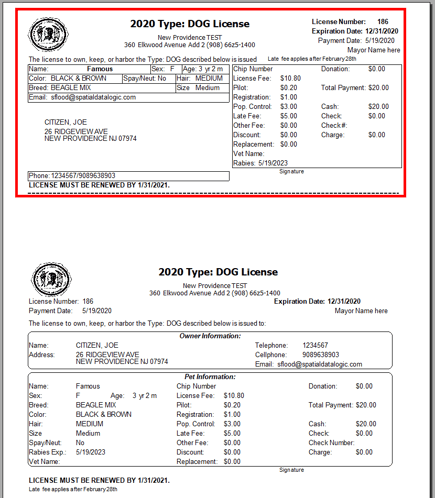
- Added - Alternate Pet License: windowed envelope format
- Updated - Inspection Copy Icon will now prompt to copy or create a template: CanOnlyViewServiceRequests
- Updated - Associated SR/INSP attachments on the parks form can now be manually refreshed
- Fixed - "Order by" to include Districts on SR report
- Fixed - Issue with multiple repair codes being selected in the Report options
- Fixed - Issue with Past Due Equipment Task Report
Alternate Pet License
By request, we developed a new alternate Pet License. This license is designed to fit in a normal windowed envelope, in order to cut down on the need for mailing labels and reduce the effort of stuffing envelopes. Simply cut along the dotted line and put in the envelope with the corresponding physical tag. To turn on this feature, go into Tools | Pet Options | Pet Types Tab | Select the pet type and Edit | on the general tab check off Use Window License.
Utilities - 20.2
- Updated - Inspection Copy Icon will now prompt to copy or create a template: CanOnlyViewServiceRequests
- Updated - Associated SR/INSP attachments on the parks form can now be manually refreshed
- Fixed - "Order by" to include Districts on SR report
- Fixed - Issue with multiple repair codes being selected in the Report options
- Fixed - Issue with Past Due Equipment Task Report
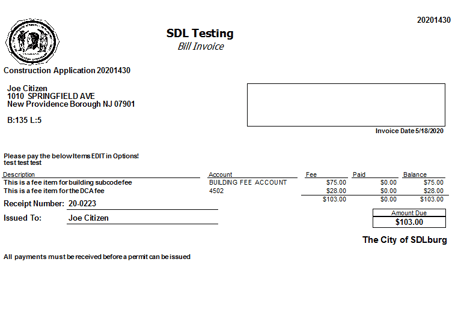
Invoice Report
Several users have asked for the Bill Invoice Report to be added to their local forms of payment. This update adds a button to the payment's control to directly open the report.
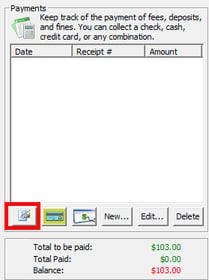
The report reads directly from the Fee Items associated with the Bill of the current application.
Also note: if you hold shift, you will get the Bill Properties form so you can quickly edit the information on the Invoice.
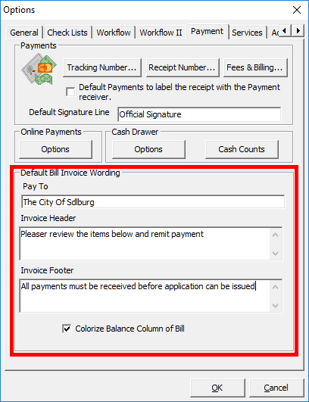
Note: many defaults for the Bill Invoice Report can be set in the options. Under the Tools Menu | Options, go to the Payments tab.
Default location and owner information may still need to be wired up on some forms and this report can also be automatically added as an attachment. Please let support know if you believe this feature would also be beneficial on any of the applications you work in.
LogMeIn from Help Menu
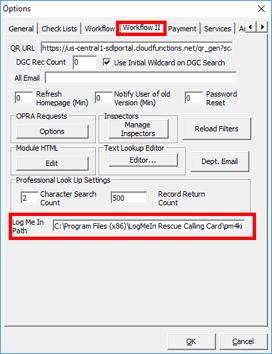
Many users have older installers of LogMeIn on their local desktops. Unfortunately, this link started failing a couple of years ago, requiring users to need to use the PIN Code option, rather than the LogMeIn Online Support Option in the Help Menu. Although this does work, it usually takes longer to get a PIN and run an installer. This update allows us a workaround to point your local desktop's Help Menu to an updated LogMeIn executable.
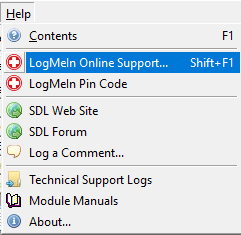
You will be required to manually run the installer found in the link below, on each affected desktop. A path setting for the location of the executable will also need to be set once. This is a town-wide setting and will only have to be set once. This should work for all Windows 7 desktops and above. Each user will also need the UseLocalLogMeIn permission so as not to interfere with working desktops. Please call support if you have any questions: 732-357-1280 option 1.
Delete Payment Request
A request for a new permission to delete Credit Card Payment Requests has now been implemented. The issue was only users with the CanDeletePayment could delete online payment requests. If a citizen comes in to pay in person, users should delete the payment request so as to not allow a duplicate payment. The CanDeletePayment is a high level permission and should not be given to all users, but contacting those users to delete requests is tedious. We have now added a CanDeleteCCRequest permission, this should be given to any users that handles payment to allow them to clean up outstanding payment requests.
Show Only Visible Fields
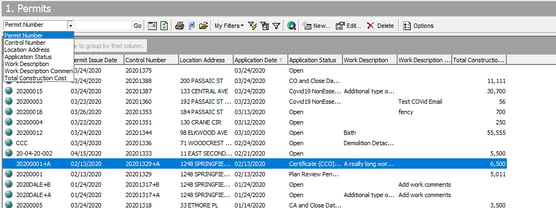
We have added a check box to "Show Only Checked Fields" on the Datagrid Field Chooser form. This will limit the fields seen to only those set to visible on the Datagrid. As an extra feature, this will also limit the list of fields in the search drop-down to only those visible. This will reset when you log back in, but let us know if this something you would like saved.
Text Viewer Pop Up
We have continued to add the text viewer pop up window to more entry boxes. The Pop up window is a separate sizable window for you to more easily read notes. You can access it by double clicking on the entry box This update includes Complaint and Prior Approvals, among other module forms. If you have a entry box you want this added to let us know.