![SDL - 2025 New Logo.png]](https://help.getsdl.com/hs-fs/hubfs/SDL%20-%202025%20New%20Logo.png?height=40&name=SDL%20-%202025%20New%20Logo.png)
SDL Desktop - 21.2.1
- Added - Spell check to text look up add
- Added - Option to show OPRA portal page link on email
- Added - OPRA Portal link to home page status column
- Added - OPRA Portal link to OPRA form
- Added - Projects to COAH Form
- Added - COAH to Land Use info pane
- Added - Attachments to COAH
- Added - Label to show if fees are adjusted
- Added - Email button to COAH
- Added - Tab to show linked Construction Applications
- Added - Option to show Tenancy results in map search
- Updated - Adjusted start date in inspector availability
- Updated - Swipe file syncing
- Updated - OPRA Assignment on Homepage to not show if the Application is completed
- Updated - New quick escrow accounts will now default to Escrow Fee, you can also set a default in Escrow options
- Updated - Credit card payments paying off a balance should now fill in the bill
- Updated - SDL Forms, as part of a Portal Request, will now add as a PDF on the created attachment
OPRA Assignments Using Professionals
We recently added the ability to collect data for OPRA Requests from departments with no SDL users. Simply create a Professionals entry for these department using the manage professionals tool. Then, on the Assignments tab of the OPRA Request, select Multiple Pros to add these departments (professionals) and email them the request for data. For more information on this feature, check out our full guide in the Help Center, by clicking the link below.
OPRA Assignments Using Professionals - Help Center Guide
COAH
Several additions have been made to the COAH form. Notes have been moved to its own tab and has been turned into a rolling notes field. This will add the username and time stamp to each rolling notes entry. The attachments control has also been added for related documentation. Additionally, users can now link a project to a COAH application. However, the most impactful addition with this update is the ability to link a Construction application to a COAH application.
Construction will be able to see the development name and the balance on the permit, and more importantly if a balance exists it will not let them issue a certificate for the construction application. You can link these from either the construction permit or the COAH application form. To start, the COAH Application can be linked to many construction permits but a permit can only be associated with one COAH Application. We will review this for the next update based on user feedback.
Project Link
.png?width=687&height=551&name=Picture1%20(3).png)
Attachments
.png?width=650&height=521&name=Picture2%20(3).png)
Application Link
You will need the control number of the permit to add a connection.
.png?width=684&height=549&name=Picture3%20(2).png)
Portal Payment Search
At the end of last year, we released the ability to add a statement to invoices giving citizens the option to go to the Portal to pay their invoice by credit card. This allows you to accept credit card payments without the need to send an email for a payment request to the citizen. During the last release, we added this functionality to Property Registries, but with this update it is now also available for Construction Ongoing Location Invoices and Clerk Mercantile Invoices.
Provided you have a MuniciPAY account and use this option, you will see a statement like the one pictured below added to your printed Invoice. This does use the Online Payment Request functionality, and as we have advised for all online payment requests, if you do take in a check we recommend you delete the payment request so the citizen doesn't accidentally pay twice.
.png?width=541&height=57&name=Picture10%20(1).png)
OPRA Portal Page
The last Portal update included a new record page for each OPRA request. This Desktop update includes the option to add a link to the email sent from the OPRA form. The main advantage of using the Portal in this way is to enable users to send requestors access to large documents that can not be emailed. By marking an attachment as Public on the Portal, the Portal will bring that document up for the applicant to download.
This last Desktop update prompts the user to mark which attachments should be made public when they mark an OPRA application as complete. You will need to make OPRA pages available to the public and contact Support to turn on the sync client for your OPRA applications. The option in desktop can be Found in Tools Menu | Options | Workflow tab | OPRA Options.
Email Sample
.png?width=688&height=449&name=Picture4%20(3).png)
Portal Page
.png?width=681&height=369&name=Picture5%20(3).png)
Link to visit Portal Page from Desktop
.png?width=658&height=528&name=Picture6%20(3).png)
The option in desktop can be Found in Tools Menu | Options | Workflow tab | OPRA Options.
.png?width=688&height=375&name=Picture7%20(2).png)
OPRA - 21.2.1
- Added - Board Member Status field to DGC - requires DGC update
- Added - License plate state to Parking Permits
- Added - Mailing Email field to Mercantile DGC
- Added - Links to update board member expiration date
- Added - OPRA DGC to clerk section - please call support to get this update
Code Enforcement - 21.2.1
- Added - Option to add credit card payment link to Property Registry invoice
- Updated - Made changes to the Code Violation report
- Updated - Daily bank report to use payment comment for description
- Updated - Units section of info pane
Construction - 21.2.1
- Added - Option to add credit cark link to Ongoing Location Invoices
- Added - Option to add desktop renewal to Ongoing Location Invoices
- Added - Option to email Ongoing Location Invoices
- Added - Rolling notes to violation form
- Added - Online Plan Review status section to homepage
- Updated - Plumbing tech card commercial stamp will now be capitalized
- Updated - Mechanical Tech Card - Note: Oil piping is not piping, removed hydronic piping, added generator
- Updated - Mechanical subcode, added generator values
- Updated - Building subcode, added mult other
- Updated - How Final Inspection notice checks subcodes
- Updated - Inspection notice letters will now use the same contact department footer info from the permit pickup letter if there is a value there
- Updated - Variation fees will now show on the permit
- Fixed - Permit warning link on locked permits
- Fixed - Label issue on Non UCC certificate
Engineering - 21.2.1
- Added - Email functionality to Pool Request
- Added - Installation as work type to Road Opening form
- Added - New Road Opening Permit
- Added - Permit Title field on the form
- Added - Permit body field to the form
- Added - Link to help fill in work surface to Road Opening form
- Added - Link to help fill in work description to Road Opening form
- Fixed - Issue with Road Opening Portal Request not filling in work type
- Fixed - Issue with work type not filling in on Road Opening Request
Fire Prevention - 21.2.1
- Added - Business permit type counts to LEA form
- Added - Option to use payment number as invoice number for credit card payment option
- Added - Credit card statement to full invoice
- Fixed - Issue of annual registration report not resetting some values
Health - 21.2.1
- Updated - Adjusted Well Permit report to show type
Land Use - 21.2.1
- Added - Boards DGC with all BLQs
- Added - Professional lookup to applicant entry form
- Added - Tabled to Planning and Zoning boards result options
- Added - Violation count field to Zoning Inspection DGC
- Added - Administrative Approved to boards decisions
- Updated - Zoning comments and results can now open a larger viewer with spell check
- Updated - Boards should default the town selected in the admin module
- Fixed - Issue with opening complaint on inspections when opened from the Info Pane
Utility - 21.2.1
- Fixed - Issue with Copying Service Request attachments when creating an Inspection from the Service Request
Utility Generic Review
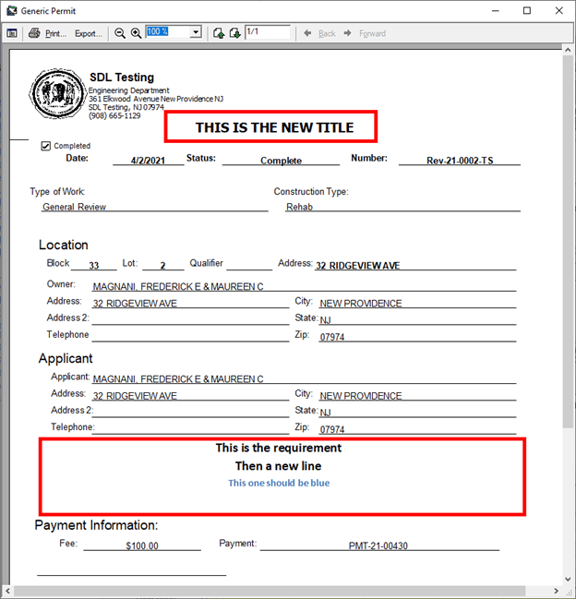
We added a text box to change the title of the Generic Review permit, in addition to the ability to add a digital signature to the permit. We have also added a new permit report option that allows for town specific statements on the permit.
Like the last update’s New Clearing form and permit, you can format a statement in word and copy it to the application to print on the permit. You do have limited space, but this should greatly increase your options of how the permit looks. These same options were added to the Engineering Road Opening Permit. It is Recommended to set one application up and make it a template, so when you create new applications you can apply those settings.
.png?width=576&height=462&name=Picture8%20(2).png)