![SDL - 2025 New Logo.png]](https://help.getsdl.com/hs-fs/hubfs/SDL%20-%202025%20New%20Logo.png?height=40&name=SDL%20-%202025%20New%20Logo.png)
SDL Desktop Update 22.2.1
- Added - Option to change the search distance to find closest parcel
- Added - License count to database
- Added - Police to fee item special manager report
- Added - Resend op email to payment form
- Added - Redo online payment URL to DGC
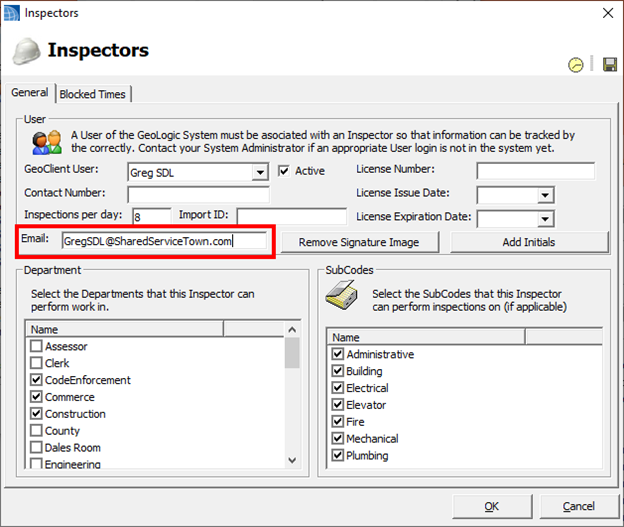
- Added - Alternate email to inspector record
- Added - Option to request attachments on Portal requests
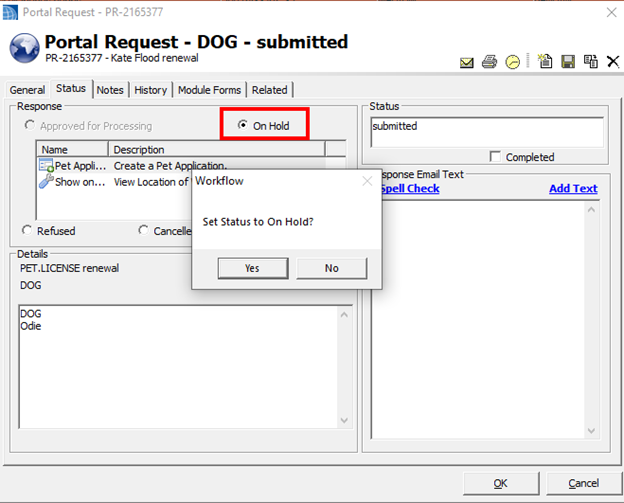
- Added - On Hold option to Portal requests
- Added - Option to use map selection for complaints reports
- Added - Ability to clear and recalculate bill paid columns on the payments control
- Added - Restore complaint by tracking number
- Added - Ability to get updated email wrapper HTML
- Added - New homepage section for SDL Online forms
- A permission is needed to view
- Added - Option to overwrite the owner name value with a set label on 200 ft offset report
- Added - Applicant name to requests section
- Added - Option to mass update users as active and require password changes to user manager
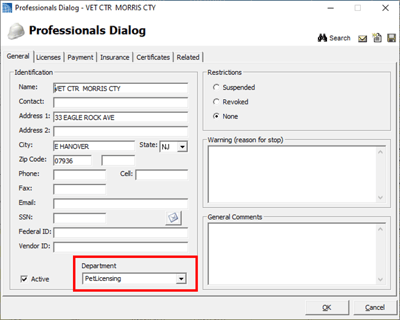
- Added - Department label to professionals form
- Added - Ability to mass set department from professionals DGC
- Added - Option to load professionals by department
- This was previously only set up for Pet Licensing Vets
- Updated - User manager will default to only show active users
- Updated - Removed carriage return chr(13) from csv export
- Updated - Optimized user datagrid loads on log in
- Updated - Users can edit the base professional license tracking number in the types editor
- Updated - Check for negative fee amount when creating municipal URL
- Updated - System will remove historical database references
- Fixed - Issue with new complaint types being created if an existing new complaint exists
- Fixed - Issue with Single Mailing label report
*Please note that the updates for the Email Wrapper, Request Documentation and Inspector Daily Stops will also require a full SDL Portal update that is planned for this upcoming weekend.
Email Wrapper
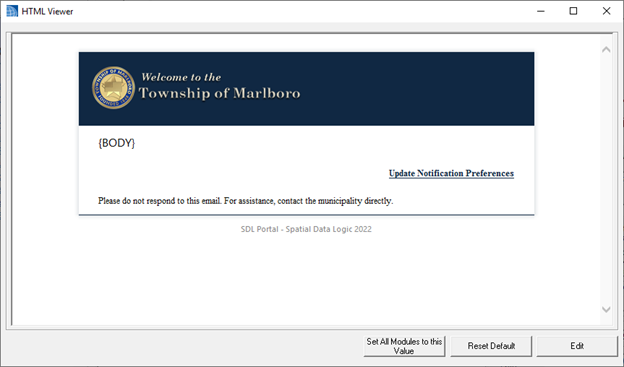
SDL Desktop has the ability to add HTML around the body of SDL Desktop emails. By default, we have used settings from available SDL Portal images. This setting is able to be manually edited per town.
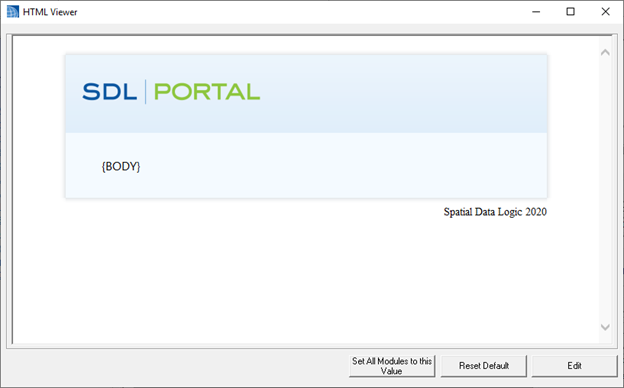
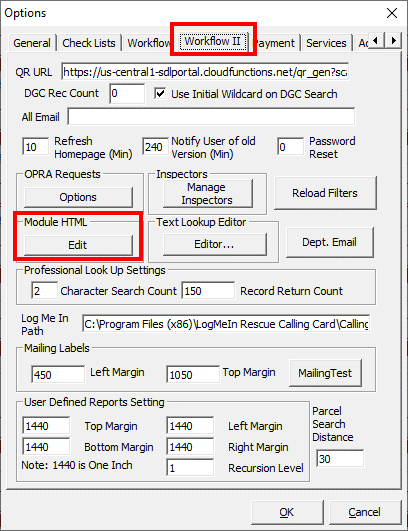
This update has included a Reset Default button on the HTML Editor form. This will now grab images and color schemes from your town's SDL Portal settings.
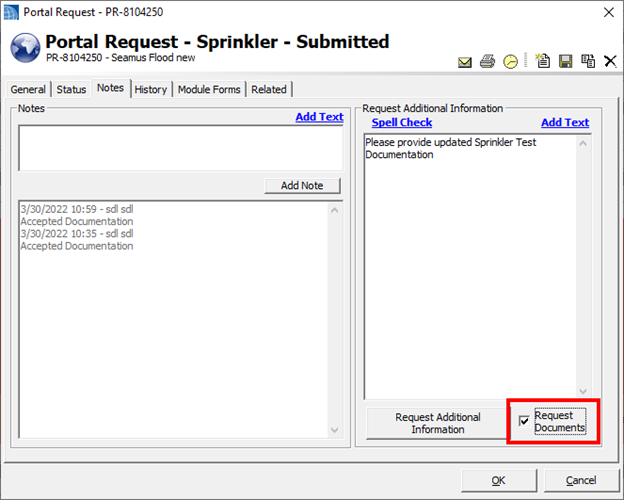
The updated request page will then provide an area for the applicant to add additional files. *Note, only 5 files can be added at one time.
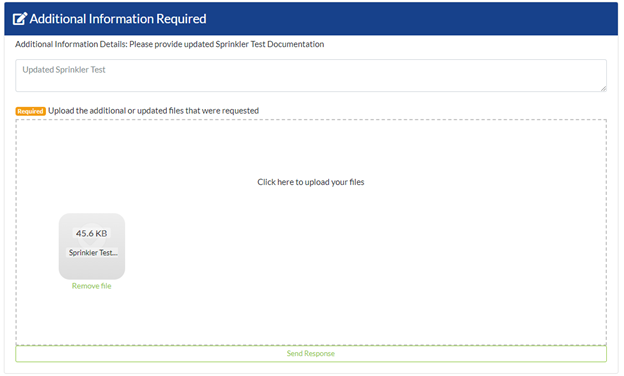

This update includes a new Portal Request Status: On Hold. This status is meant to let users know they should not process a request. This can be used with the Document request, or if you have an internal or department prior-approval that must be completed before you process the request.
More and more towns are taking on shared services, while many inspectors also work in multiple towns. SDL Desktop has had the ability to set an option to receive Daily Stops reports in the Construction and Fire Prevention modules. With this update, users can now add an alternate email address to the Inspector form. This will prompt the Portal to send this inspector's Daily Stops list to the provided email address.
Although we understand that the State and Federal Daniel's Laws have not yet been finalized, we have already begun incorporating features to assist towns with compliance. As a part of these features, we have added an option to not include the owner name in the 200 foot offset list report, or mailing labels. If you add a value in the options, that value will be used to overwrite the label on the reports. Leaving the value blank will allow the correct MODIV tax record owner's name to populate as usual.
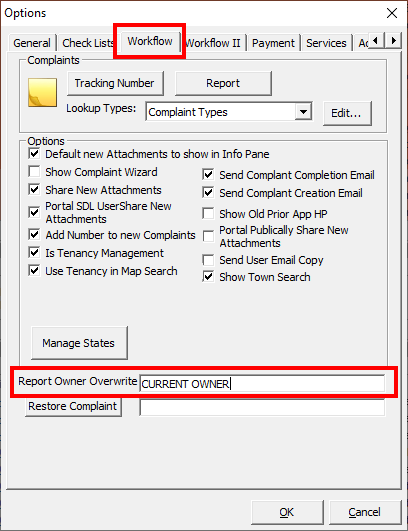
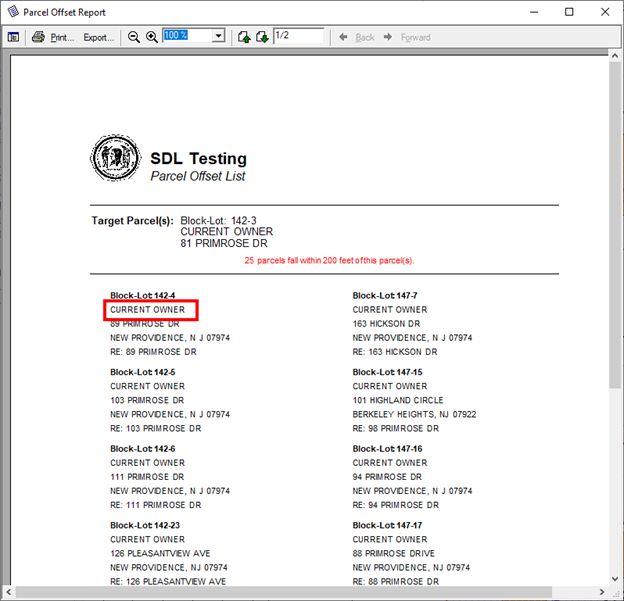

Manage States Field
The SDL state field defaults to 2 characters in length, however many other countries may use 3 or 4 characters. We recommend users adjust this setting in the Options | Workflow | Manage states. Select Alter field length and enter 4 to update you database setting.
%20(1)-png.png?width=300&height=390&name=image%20(19)%20(1)-png.png)
%20(1)-png.png?width=300&height=363&name=image%20(20)%20(1)-png.png)
Clerk - 22.2.1
- Added - Currency format to Parking Permit amount paid
- Added - Prompt to use monthly fee calculation on renewal license from datagrid
- Added - Keep Permit Number to parking lot options
- Added - Email icon to Parking Permit form
- Added - Checks on Board Resolution report to turn off signature line if the associated attorney, mayor, clerk labels are blank
- Added - Last payment info on the parking permit DGC
- Added - Boat, unit, bike, outdoor count fields to mercantile application
- Added - Business type to mercantile application
- Added - Waste hauler field to mercantile application
- Added - Long invoice option to mercantile license
- Added - Town name label to options
- Added - Room count, machine count and rental count to mercantile application
- Updated - Board member types are now in alphabetical order
- Updated - Mercantile application GUI
- Fixed - Issue with attachments not being added from mercantile renewals
- Fixed - Issue with emailing parking renewal
- Fixed - Mailing label on Parking Permit
Code Enforcement - 22.2.1
- Added - Inspector name/statute number to homepage violations section
- Added - Registry type label for portal renewal labels
- Added - Option to split property addresses from datagrid for imported City/State/Zip all in city field
- Added - Multi page print button
- Added - Option for unit certificates to include tenants
- Added - Quick add certificate to unit editor
- Added - Quick add inspection to certificate application
- Added - Owner 2 fields to property registry
- Added - Delay in inspection photos report, so all images load
- Added - Add multi contact button to certificate and tenant tab
- Added - Gender field to contact form
- Added - Option to show date of birth or gender on certificate with tenant name
- Added - 90 day expiration link to certificate form
- Added - Show inspection info option on certificate form
- Updated - Reports will use Town Name in the report title, the city field in the settings will still display in the body of the report, for the department information
- Updated - All unit certificates can now list most recent tenant contacts
- Updated - Quick add tenant to add a certificate and inspection
- Fixed - Issue with adding attachments when the file name has a slash in it
- Fixed - Label issue on violation abatements home page section
Construction - 22.2.1
- Added - Backflow active record count to ongoing location DGC
- Added - DGC option to mass print certificates
- Added - RFT letters option to permit application related tab
- Added - Multi Fees option to permit application additional fees
- Added - Commercial option to activity log report
- Added - Live and occupancy load labels for alpha numeric labels on the certificate
- Added - Ability to mass update existing tech cards from the Task Item: Update Permit Signatures
- It is recommended to run this moving forward on a nightly or weekly basis to keep tech cards accurate with current inspections
- Updated - UCC jacket will only show residential use group if an R is present
- Updated - Ongoing location invoice items section
- Updated - Changed background color of current day on inspection availability on inspection form
- Updated - All tech cards inspection dates to use year
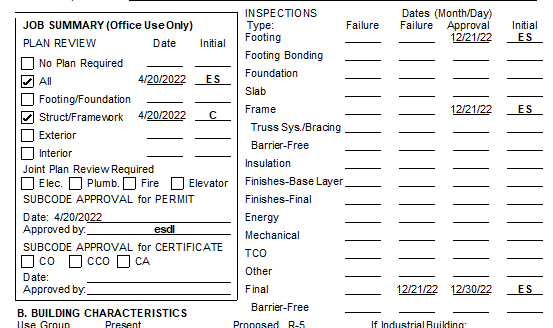
- Updated - All tech cards signatures to use printed value of signer for legibility
- Updated - System will now save the user's PIN until they log out, so they do not need to reenter it for every permit they sign
- Updated - Final inspection check will no longer check change of contractor permits
- Updated - Additional contact will now fill in the responsible person field on the permit jacket
- Fixed - Issue of alteration/demo not checking on UCC jacket
- Fixed - Issue with B and CFB Fee Schedules
- Fixed - Issue to stop users from saving a negative certificate fee
Construction - Signatures
Engineering - 22.2.1
- Added - Resolution number to road opening and its report
- Added Multi fee columns to road opening DGC
Fire Prevention - 22.2.1
- Added - Additional check when updating the penalty fees on an invoice from an inspection
- Added - Option to change invoice tracking numbers
- Added - Credit card option to the invoice will now use the invoice number by default
- Added - Invoice wording options per invoice type
- Added - Multi fees to detector requests
- Added - Digital signature to Order to Pay Recurring Report
- Added - Digital signature to Alternate Certificate
- Added - Digital signature to Notice of satisfactory inspection
- Added - Option to bulk invoice to print in batches
- Added - Required test check boxes to structure, in correspondence with dates, you can now be warned about out of date tests
- Added - Additional notes fields for structure sprinkler/generators/smoke control
- Added - Void label to paid column on unit invoices
- Added - Owner email to detector request form
- Added - Email list field to fire investigations
- Added - Email option to fire investigations
- Updated - Closing out of new quick descriptions will not save the entry
- Updated - Invoice penalty fee will no longer remove NLHU fees on the invoice
- Updated - Fire investigation narrative to keep formatting
- Updated - Reason for status will now print on the Time Extension response, to show the denial reason
- Fixed - Issue where is Paid was marked on on a credit card payment request
- Fixed - Issues with BC LHU types not setting correctly
- Fixed - Issue with fee label on Detector Application report
- Fixed - Issue with fire investigation photos report not saving as an attachment
Land Use - 22.2.1
- Added - Closure date to violation info pane
- Added - Email All option to zoning closure tab
- Added - Work complete/reviewed field to zoning application
- Added - Option to create a violation from a complaint
- Added - Record count option for zoning applications section on homepage
- Added - Ability to change sort order of zoning applications section on home page
- Added - Option to search MODIV tax data zone information when linking a zoning application
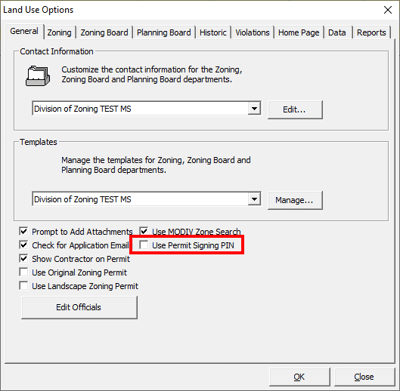
- Added - Option to require PIN to sign permits
- This will require permission changes for users
- Fixed - Issue with location label on Bill Invoice for zoning application
- Fixed - Issue with decimal place in total for zoning daily bank
- Fixed - Issue with editing linked complaint from the zoning inspection
Land Use - Signatures
This update will add an option to require the Zoning Officials to use a pin code in order to sign Zoning Permits with a digital signature. As requested during our last Land Use round table, this new setting will lock down the use of a signature on the permit. Currently, the system will display the signature for anyone printing the permit, provided a signature was added for the selected Zoning Official. As in the construction module, the Zoning Official will need to enter their own pin when signing the application. Only then will the signature display on the permit. Once a permit is signed, anyone can print the permit with the signature.
By default, we will not turn this on. If you would like to utilize this feature, you will need permissions for an administrator and the zoning officials. First, a user will need the CanSetUsePIN permission. This will let them turn on or off the requirement for the signature pin on the report. This is to stop the user from turning on the options whenever they would like to print the permit with a signature, as it currently does. Next, each Zoning Official's user account will need the CanSignZoningPermit permission. Only users with this permission and a valid pin can sign permits. After this, you will need to set each Zoning Official record with their SDL Desktop user.
-png.png?width=339&height=228&name=Picture16%20(1)-png.png)
Each Zoning Official can then go into the File menu to set their unique pin.
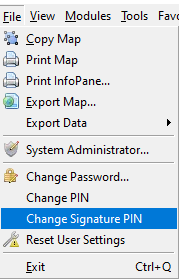
Once this is all set, the administrator can turn on the Use Signing Pin option.
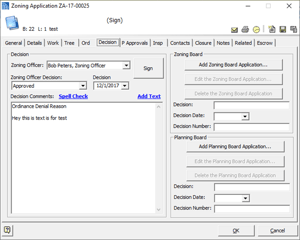
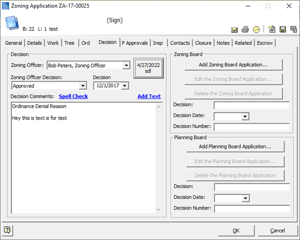
On the zoning permit, a new Sign Button has been added next to the Zoning Official decision. When the official clicks on this button, they will be prompted to enter a pin. Provided this matches their user account setting, the signature image will be added to the record with information detailing who signed it and when.
Pet Licensing - Vet Professional Lookup
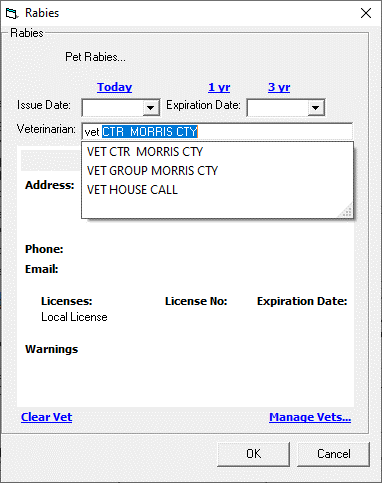
We have updated the Vet Professional lookup to only search professionals assigned to Pet Licensing. You will need to click the Manage Vets link and set all your common Vet professionals to the Pet Licensing department. This should make searching more simplified going forward. We will add this functionality to other modules as requested - please reach out if you would like to see it elsewhere.
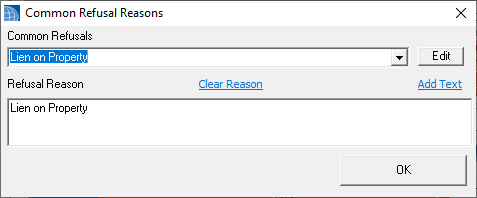
Note - For Pet Licensing, the previously mentioned updates for setting SDL Portal Requests to On Hold, and Requesting additional Documents should be helpful for Pet Licensing users who need valid rabies documentation, who do not want to refuse the entire Pet Licensing request.
Public Works - 22.2.1
- Added - Email icon to road opening form
- Added - New permit report using the new permit body RTF section on the form
- Added - Option to change permit default title
- Added - One call, traffic permit number, surety, resolution number fields to road opening form and DGC
- Added - Multi fees to road opening
- Added - Multi fee columns to road opening DGC
Utility - 22.2.1
- Updated - Alphabetize service parts list
- Updated - Service Request from complaint will fill in the email for the requestor