![SDL - 2025 New Logo.png]](https://help.getsdl.com/hs-fs/hubfs/SDL%20-%202025%20New%20Logo.png?height=40&name=SDL%20-%202025%20New%20Logo.png)
SDL Desktop - 21.1.1
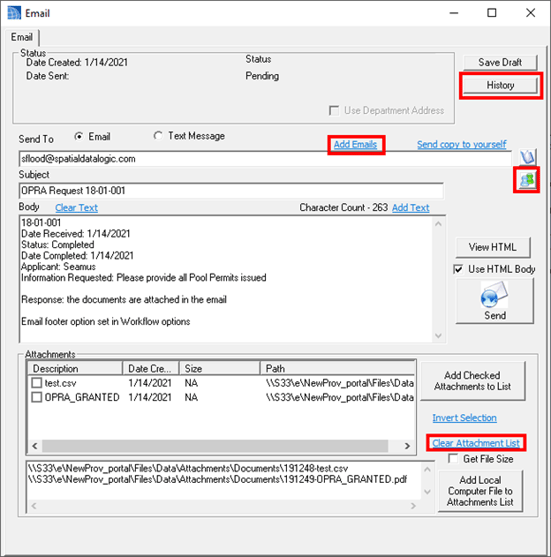
- Added - History to email tracking
- Added - CSV export to mailing label manager
- Added - Code to save copy of escrow application
- Added - Use prompt for project review letter to add as attachment
- Added - IsPortal and Ismobile tags to complaint/OPRA history
- This still requires updates on SDL Online
- Added - Blank default line to new Prior Approvals
- Added - Link to project letter to use professionals for to address
- Added - Does Not Save label to text viewer if it is view only
- Added - Location name column to Parcel Search Form
- Added - Option to not show, Show All requests on homepage
- Added - Ability to process Online Forms from home page
- Added - Ability to add Online Forms to request attachments
- Added - Return Email Body to Requests
- Added - Unpaid as reason for blocked time
- Added - Response Words to OPRA Request
- Added - Echeck total to Fee Items totals report
- Added - Online Payment DGC of payments waiting to be processed
- Added - Not Valid, Declined and Granted ORPA reports
- Added - Add Text link to Email addresses to make common email lists
- Updated - Bill comments will no longer update '' values - UpdateComments
- Updated - Increase Pay notes field
- Updated - Swipe warning for zero balance or less
- Updated - Debugs should now use user name in the file name
- Updated - Multi fee editor check module unchecks itself
- Updated - Counter payments parcel search
- Updated - On OPRA completion, users can select which attachments to make Public
- Updated - Reworked how Custodians are loaded to speed up load time
- Updated - Online Payment DGcs to include IsEcheck and Echeck totals
- Updated - You can now drag and drop into the path field for a new attachment
- Fixed - Issue with bad characters in URLS
- Fixed - Construction Invoice attachment save
- Fixed - Issue with Property alias owner not filling in on parcel search form from an application
- Fixed - Issue of Project lead not getting set
OPRA Reports
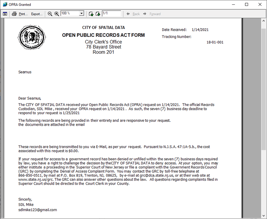
We added 4 new reports to be used with OPRA requests: Granted, Denied, Not Valid and Exemptions. These were developed based on samples from the state, https://www.state.nj.us/grc/custodians/toolkit.
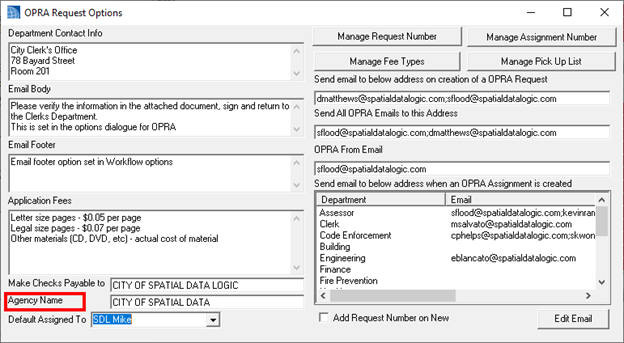
Reports will fill in based on your settings and the response or denial notes on the request application form. Please review the OPRA options in the Tools Menu | Options | Workflow tab. Please let us know if you would like additional reporting or options for the wording we have provided.
 .
. 
OPRA Workflow
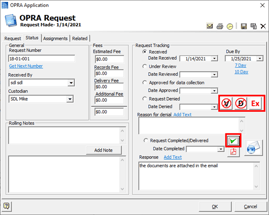
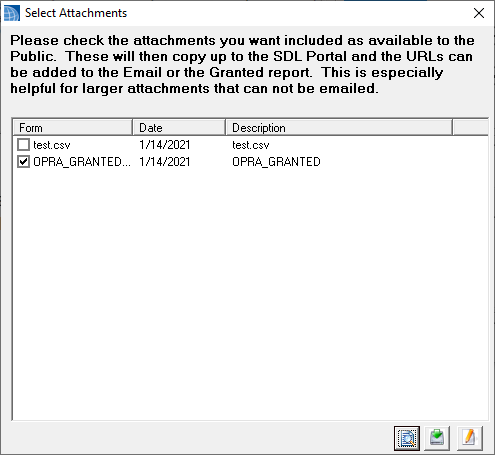
When you mark a request as completed, you will now be prompted to choose which attachments you want to make available to the public on the portal. All items checked on this form will be marked as Portal Public User. Note, you can manually check or uncheck this value on the attachment form as well, or enmasse from the attachments datagrid.
With this option turned on, the user will be able to download the file from the Portal. A future Portal release will include an OPRA request Webpage, to see these attachments. As part of this workflow, when you click the email button on the form it will automatically assign Public attachments as attachments on the email. This will save the user a few clicks. Note, it is recommended to print preview and add as attachment for any of the new reports prior to emailing.
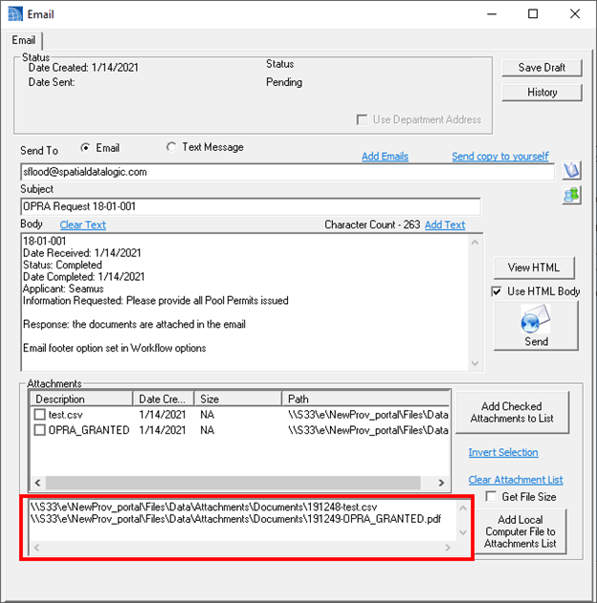
Email Form Updates
Clerk - 21.1.1
- Added - Ability to copy a parking application
- Added - Notes to Parking Application DGC
- Added - User prompt to add as attachment from Findings report
- Added - Ability to delete multiple dates
- Added - Tow Truck Drivers/Licenses Datagrids
- Added - Option to add parking permit as an attachment
- Added - Total Balance and paid columns to DGC
- Added - Drag and Drop into Attachments control
- Added - License plates field to Parking Application Datagrid
- Updated - Conditions will now show on taxi invoice
- Updated - You can now copy Special games dates without an end date, to allow for times
- Fixed - Issue occurring when deleting a taxi application did not delete the drivers or owners from the Database
- Fixed - Issue with emailing from a general application
- Fixed - Issue with application not showing as linked
- fixed - Time stamp on games certificate
- Fixed - Issue with Raffle List report
Code Enforcement - 21.1.1
- Added - BLQ label to Alternate certificate report
- Added - Load Owner from Property to Violation
- Added - Invoice attachment to License DGC Email Option
- Added - Email option to Property Registry and license DGC Options
- Added - User prompt to mark attachment as public when a certificate type has a signature
- Added - Rent Increase percentage field to Rent Update DGC
- Added - CC payment options to Violation form
- Added - Mailing Email Address to Property Registry and License DGC
- Updated - Upped Unit count display on info pane to 50
- Updated - Removed limit of last 3 years of inspections on info pane
- Updated - Inspection to load property if BLQ is filled in
- Updated - Property Owner Review form to look up Inspections and violations
- Updated - Violation Payments Control
- Fixed - Issue of Purpose not filling in by default on Certificate portal requests
Construction - 21.1.1
- Added - DGC to show Permits with Over ridden fees (ie exempt, waived, discounted, ect)
- Added - Link to Application to look up tenancy owner, which if used in Code Enforcement properties can be more up to date
- Added - User prompt on signing a certificate to ask if you want to make the attachment Public on the Portal
- Added - Work Description comments to work type of pick up letter
- Added - Signed field to Certificates Datagrid
- Added - Agent Email to Permit DGC
- Added - AM/PM column to Inspections DGC
- Added - Email Pick up letter button to form
- Added - Notes tab to Inspection/Sign off form
- Added - Overview tab to Inspection/Signoff form
- Added - Exempt Log report
- Updated - NON UCC Certificate for comments space
- Updated - Signing a certificate will now prompt to save as an attachments
- Updated - Signing a certificate will prompt for an issue date first
- Updated - Payment requests will use full name now rather then initials
- Updated - You can now unsign a certificate if you hold shift when clicking the sign button. You will still need a PIN number and valid permissions
- Updated - NON UCC Certificates will check off for completely capitalized names that match the check boxes, ie CERTIFICATE OF CONTINUED OCCUPANCY
- Update - When entering a certificate issue date, system will now check permit closure status
- Updated - Removed Portal Inspection Count button: these settings are now in the Portal
- Updated - Plumbing tech card
- Fixed - Issue when no Use group is chosen on a permit and it fails to save
- Fixed - Date label issue on Metrics reports
- Fixed - Issue where collected by label on permit would use payment without an amount paid
- Fixed - Issue with Rolling notes and opening the larger viewer
- Fixed - Issue with TCOs being checked for completion
- Fixed - Variation payment issue on activity report
- Fixed - Issue when updating updates to VOID on un issued permits
Engineering - 21.1.1
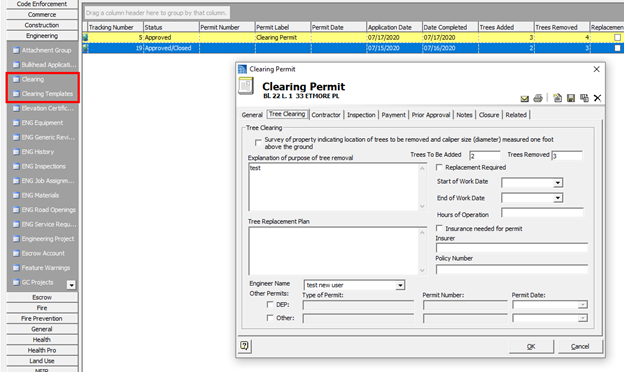
- Added - Clearing Template DGC
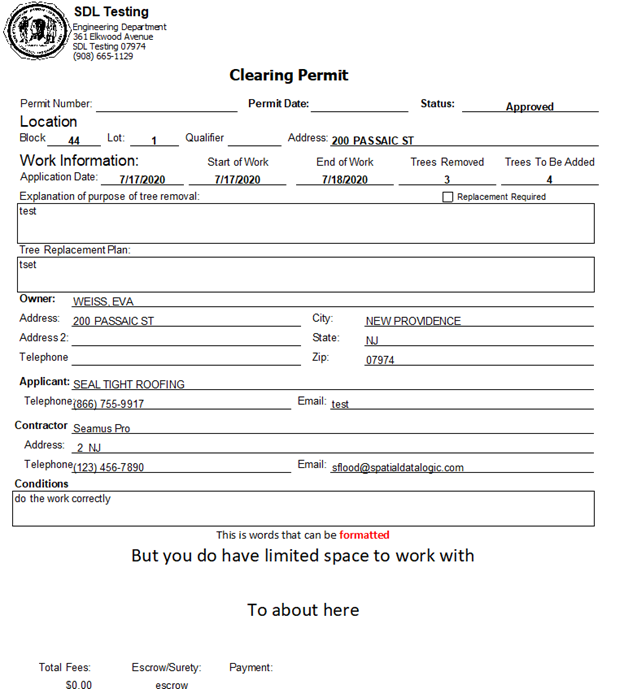
- Added - Grading Form and Permit Report
- Added - Grading and Grading Template DGC
- Added - Processing Clearing Portal request
- Added - Grading Applications
- Updated - Clearing Template processing to its own DGC
Engineering - Grading and Clearing
As a result of a round table last year, it was decided to recreate grading and clearing as two separate applications. New simplified forms and reports were created for each, and Portal Requests will be available soon. You will need to contact support to get the new datagrids, but you can access the form from the task menu. Note, templates work slightly differently than other applications. The templates DGC houses the management of the templates, but is also where you will start an application if you want to use the settings of that template.
Fire Prevention - 21.1.1
- Added - Room Occupancy Datagrid
- Added - Drag and Drop into Attachments control
- Added - Fire Official Signature to Extension Application
- Added - Print to Smoke Detectors, Misc Permits, Stand Alone Inspections
- Added - Permit types DGC
- Added - New Emergency Contact Title labels
- Added - Fine History (No GUI yet) - FireFinesHistory table
- Added - Deactivated Date to Unit
- Added - Date Completed to extensions
- Added - Date Completed to Fire Investigation
- Added - Date Completed to Variance
- Added - Date Added to Unit
- Added - Is Residential Check box to Contacts tab
- Added - Mass update for setting residential to Units DGC options
- Added - LHU Type datagrid for look up
- Added - Processing Permit Request
- Added - Processing Business Registration Request
- Added - Local ID Tracking Number link
- Added - Notice of Violation For Unabated violations only to inspection report options
- Added - Inspection Type field to Invoice Form
- Updated - Fire Upload review form will now allow you to open the attachment manager to preview attachments
- Added - Option to use Multi Fees on Invoices
- Added - New Multi fee Invoice
- Added - Create Invoice and update Invoice to Inspection editor for violation fines
- Added - Field to invoice for Online Payment URL link
- Added - Permit Type breakdown to LEA report
- Added - New Activity Report
- Added - New Unit Activity Report
- Added - New Inspection Activity Report
- Added - New Violations Activity Report
- Added - Options button to update LHU fees and record fees
- Added - Check on load for new Permit Types
- Added - Options Button to update permit fees and records
- Added - Is Paid field to Fire Fines
- Added - A violation Fines History datagrid
- Added - Processing for Portal Fire Extension request
- Added - Option to resave Fire Fine history
- Added - Has Fines/Paid Fines/Has Balance options to Violations Activity report
- Added - Digital signature to Alt Invoice and multi fee invoice
- Added - Digital signature to Room Occupancy
- Added - Digital signature to late warning and Late Penalty reports
- Added - Processing New Portal Permit Request
- Added - Processing New Business Portal Request
- Added - List of LHU and initial periodic inspection to LEA form
- Updated - Fine Manager violation selection will now save
- Updated - Sped up program load
- Updated - User will now be prompted to update NLHU expiration when paying an invoice now
- Updated - When using Multi Fee option, all violations payments should go on an invoice
- Updated - LEA calculations on LEA Form
- Updated - Inspection Numbers should now not skip a number when creating new
- Updated - You can now add invoices for violation fines on the inspection editor, you should be using multi fees if you want to use this
- Updated - New Detector inspections will use the detector tracking number as the inspection certificate number
- Updated - Room Occupancy code reference to 5:71-3.7(a14)
- Updated - Room Occupancy report will now auto attach is set
- Fixed - Issue with Contact labels on tenant tab in Unit Editor
- Fixed - Issue with Invoice Attachment not saving if user hits cancel on form
- Fixed - Issue with unit warning that did not subtract fine payments
- Fixed - Issue of inspection number getting used on certificate
- Fixed - Issue with violation linking
- Fixed - Issue with Fine Balance when adding payment to Fines Manager
- Fixed - Issues with printing Penalty letters from Invoice DGC
- Fixed - Issues with Imminent hazard report
- Fixed - Issue with LHU code not printing on Occupancy report
- Fixed - Issue with Immediate Penalty report not filling in To Address
- Fixed - Issues on the alternate Short Invoice
- Fixed - Issue of violations not showing on Status of Violations Report
- Fixed - Issue with BLQ not filling in on Extension portal request
- Fixed - Issue with permit types II- vi was getting added in
- Fixed - Issue with home page inspection not showing on certain settings
Land Use - 21.1.1
- Added - Project Payments back into Daily bank after last full updates changes
- Added - Option to change zoning application fee from selection screen, user can now hold shift to update fee
- Added - ZA Application Type DGC to Manage Zoning Application Types
- Added - Default Denial Reason, Comments, and footer per zoning application type
- Added - Option to add digital signature to denial letter
- Added - Ability to process CC payments with a Zoning Application
- Updated - You can now double click Denial and reason text boxes to get larger screen and spell check
- Updated - Made signature larger on permits
- Updated - Double clicking the denial Comments or reason text boxes will open a larger form and give access to spell check
- Updated - Zoning Application email body will now default the ZO decision comments
- Updated - Resubmittal comment will now be added to notes, not application comments
Pet Licensing - 21.1.1
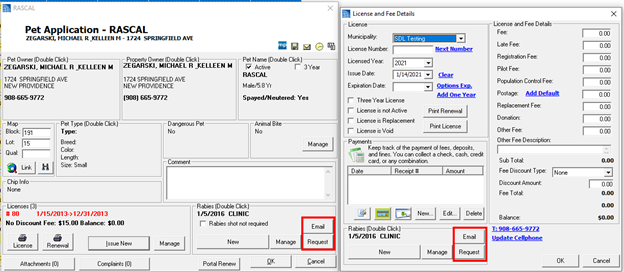
- Added - Option to email pet owner about rabies certification
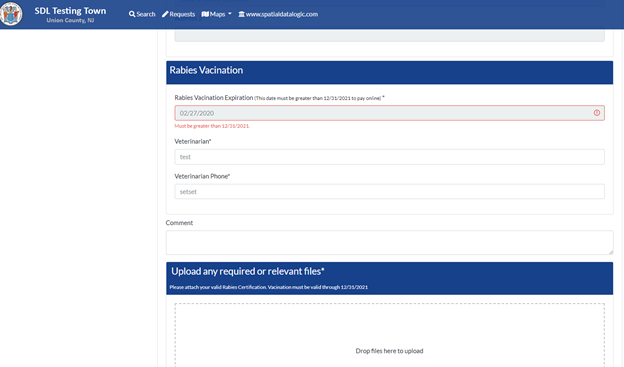
- Added - Option to request rabies documentation from a pet owner
Pet Rabies Request for Documentation
We have added two new ways to request for updated rabies documentation. Using the Email button will send an email directly to the pet owner; however, any response will go to you local email, and you will need to manually copy and attach the document to the pet record. The Email Request button will send a link to a Portal form for the pet owner to attach the documentation. This will then return to your homepage, where you can review the documentation and when approved will automatically attach to the pet.