![SDL - 2025 New Logo.png]](https://help.getsdl.com/hs-fs/hubfs/SDL%20-%202025%20New%20Logo.png?height=40&name=SDL%20-%202025%20New%20Logo.png)
SDL Desktop Fire Prevention Update 20.1.16
- Added - Title field to Emergency Contact
- Added - Email functionality to Violation Form
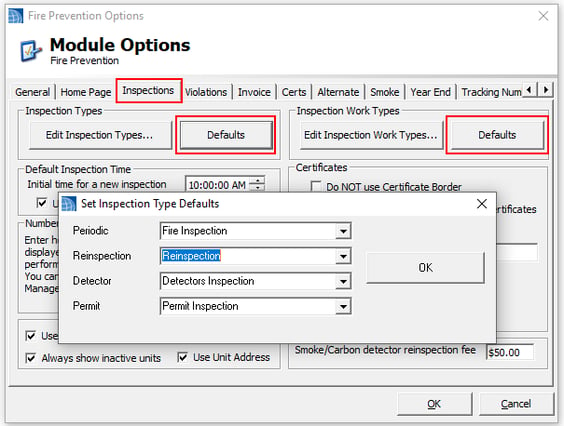
- Added - Default Inspection Type and Work Type options
- Added - Construction types to structure editor
- Added - Fine Manager to Previous Violations tab of Inspection Editor
- Updated - Adjusted Detector Certificate
- Fixed - Spelling error on pending order to pay report
- Fixed - Issue with Dedicated Fines if user prints Notice of Violation
- Fixed - Issue with Online Payment Request from an invoice not showing on home page
- Fixed - Issue with recurring penalty report options form
Fine Management
We at SDL have always felt that the fines issued in Fire Prevention should be assigned per violation, rather than a grand total. This can become quite cumbersome though, as violations can add up in any given inspection cycle.
To assist with this, we have added a Fine Management form. On the Reinspection Violations tab on the Inspection Editor, you will now find the Manage Fines button.
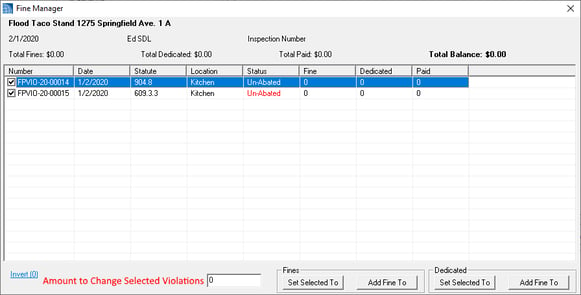
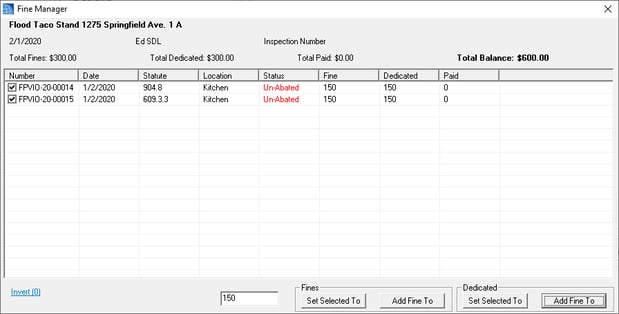
The top of the form contains general information about the inspection, including fine totals, amount paid and balances. The list will show all violations associated with this inspection. Please note, the check boxes will indicate which violations you want to act on.
The blue link below will invert the checked violations. The text box is where you will enter the value you would like to update the selected violations to. This form should allow you to add new fines, edit existing fines and, by setting the value to zero, remove fines. Please let us know if you would like additional information shown, or functionality added.
Default Inspection Types
The recent update also includes default inspection types and work types. Over time, more and more municipalities have been using their own terminology. This has caused a lot of issues with setting new inspections, and more importantly, calculating LEA numbers.
You can initially set these defaults in your Fire Prevention Options | Inspection Tab. The New Unit Inspections will use the Periodic type. Scheduling a Reinspection/Compliance/Violation Inspection will use the Reinspection type. Smoke detectors will use the Detector type. Festival/fire permits/miscellaneous permit inspections will use the Permit type. Changes to the LEA calculations will come shortly, but we recommend you start using these defaults now.