![SDL - 2025 New Logo.png]](https://help.getsdl.com/hs-fs/hubfs/SDL%20-%202025%20New%20Logo.png?height=40&name=SDL%20-%202025%20New%20Logo.png)
Note: Some features require a license in order to access functionality. When applicable, this is noted. If you try to access a licensed feature your organization does not currently subscribe to, the system will display a message letting you know you currently are not licensed for that functionality
Improvements
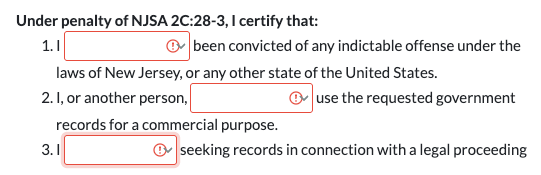
OPRA Requests - Updated Required Questions
Enhanced OPRA portal request validation to require the first question in the "Under Penalty…" section for all submissions.
What changed:
-
All three certification questions must now be answered to submit an OPRA request
Impact: Municipalities can now ensure that all required questions are answered before accepting OPRA requests, maintaining compliance with legal requirements.
Counter Payments - Updated MuniciPay Integration
Updated MuniciPay counter payment integration to comply with security requirements by removing embedded iframe usage.
What changed:
- Counter payment processing now opens MuniciPay in a new browser tab instead of an embedded iframe
- A new payment confirmation dialog appears after completing payment in MuniciPay
- Form submissions and permits automatically reload to display payment information after a successful payment
How it works:
- Click "Counter Payment" on the Additional tab of a Form Submission or “Add” on the Fees tab of a Permit.
- Click "Swipe Credit Card". This saves your work and opens MuniciPay in a new tab.
- Complete the payment in the MuniciPay tab
- Return to SDL Connect and confirm the payment completion
- The form submission or permit automatically reloads with updated payment information
Bug Fixes
Construction - Statute Search
Fixed an issue where searching for construction statutes in a violation would fail to return results.
Impact: Users can now successfully search for and add construction statutes to violations.
Data Grids - Search Results
Fixed an issue where individual form submission data grids would fail to load when a submission contained invalid signature data.
Impact: Data grids for specific form submissions now load reliably. Users can successfully search and view all submissions and permits without encountering unexpected errors.
Form Submissions - Delete Button Now Functional
Fixed an issue where clicking the Delete button on form submissions would not perform any action, preventing users from deleting submissions even when they had proper permissions.
Impact: Users with permission to delete form submissions can now successfully delete submissions as intended, allowing proper management of erroneous or test submissions.
Inspection Reports - Email Links Remain Valid After Resending
Fixed an issue where resending an inspection report by email would invalidate the link in previously sent emails, causing recipient confusion and broken links.
Impact: Recipients no longer lose access to inspection reports when new emails are sent. This maintains a reliable audit trail, and ensures that all stakeholders can access their reports regardless of how many times the report has been resent.
Inspection Reports - All Photos Now Included
Fixed an issue where inspection reports would not display all associated photos when inspections had a large number of images.
Impact: Users will no longer experience missing photos on their inspection reports. All photos attached to an inspection now appear in the generated report, ensuring complete and accurate inspection records.