![SDL - 2025 New Logo.png]](https://help.getsdl.com/hs-fs/hubfs/SDL%20-%202025%20New%20Logo.png?height=40&name=SDL%20-%202025%20New%20Logo.png)
In Connect, a violation cannot be issued as a standalone, it must be created from an inspection or from a permit.
From a Permit
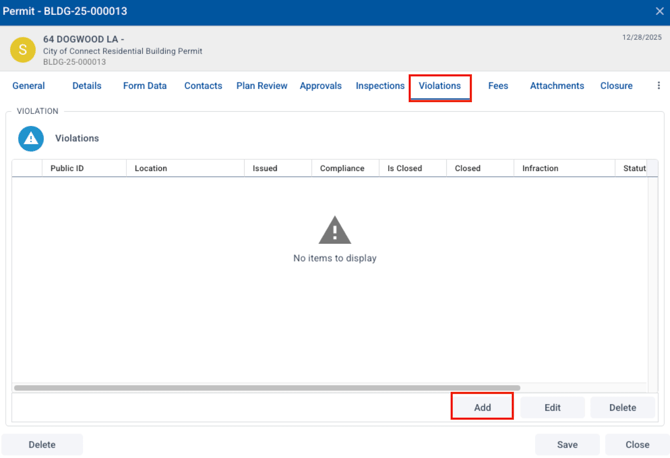
To create a violation from a permit, note that violations must be enabled in the form designer settings for the option to appear. In the permit, go to the violations tab, then choose "add."
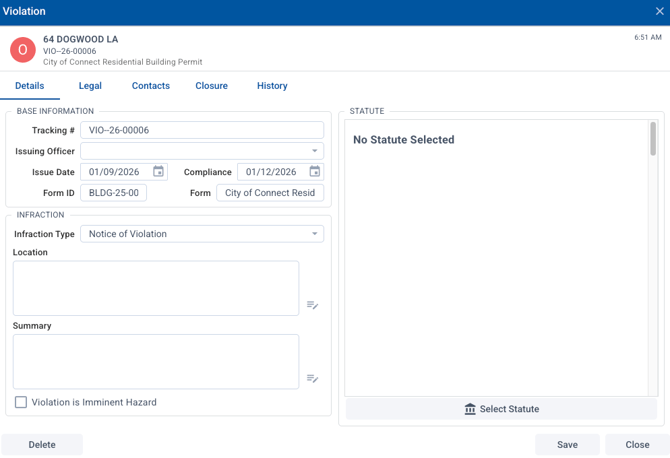
On the violations window, choose the infraction type, select statute, add issuing officer and any other necessary information. Then choose save.
To send a notice of violation, you will need to have a notice of violation letter set up in your report options (form designer / settings / reports). We can help set that up if needed. After the violation is created, go to the permit attachments tab, print report, and choose your notice of violation letter. You can then email that to the applicant.
Once the violation is closed, back in the violation record, the closure tab lets you add a closed date and any closure notes (note that the fees added there are purely for record keeping and do not connect to the general permit fees).
From an Inspection
In an inspection record, choose the violation tab, and choose add. On the violations window, choose the infraction type, select statute, add issuing officer and any other necessary information. Then choose save.
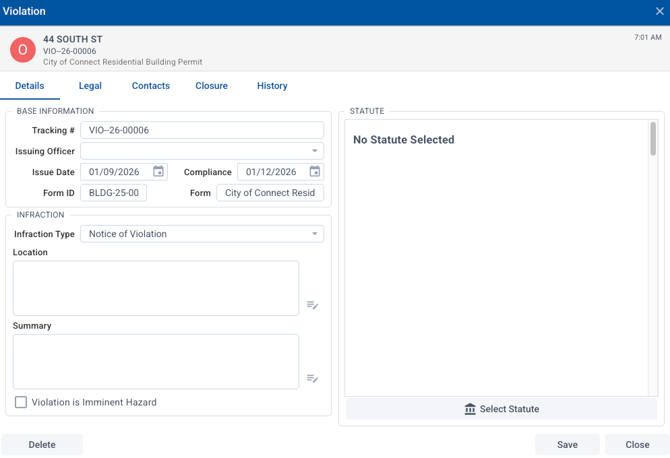
This violation information will be included in the inspection report (choosing "report" on the inspection tab) so printing another report or notice is not necessary.
Once the violation is closed, back in the violation record, the closure tab lets you add a closed date and any closure notes (note that the fees added there are purely for record keeping and do not connect to the general permit fees).