When creating an inspection report (or violation notice) in Connect that includes a checklist, you have the option to include all checklist items on the report, only those that were incomplete/failed, or only completed items.
In the inspection record, when you choose to create a report, you will be asked to select which checklist items to include:
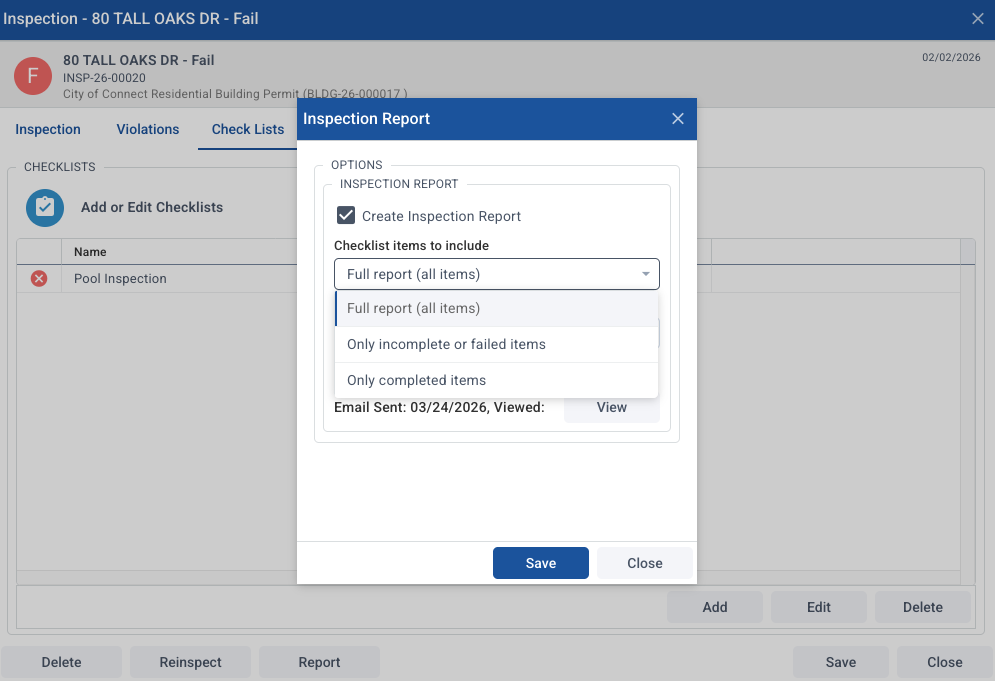
Full report (all items) - This includes every checklist item, its status and any comments.
Only incomplete or failed items - This will show each item that does NOT have a checkmark in n the Yes or N/A columns, along with its status and any comments.
Only completed items - This will show each item that is marked as Yes (not N/A), along with its status and any comments.
This is not an option on custom inspection reports or on SDL Field / SDL Mobile.