Note: Some features require a license in order to access functionality. When applicable, this is noted. If you try to access a licensed feature your organization does not currently subscribe to, the system will display a message letting you know you currently are not licensed for that functionality.
New Features
Custom Inspection Reports
Added the ability to create and configure custom Inspection Reports in SDL Connect, allowing municipalities to include required language, branding, and tailored content.
What's new:
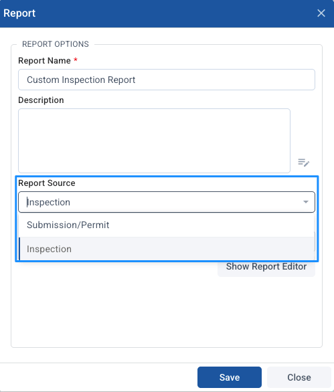
- Custom Inspection Reports can be created in the Form Settings > Reports tab with "Inspection" as the report source
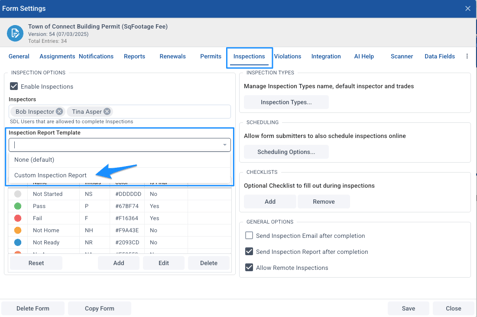
- New setting in the Form Settings > Inspections tab to select between default or custom inspection report templates
- Access to comprehensive inspection data elements including:
- Core inspection information (date, time, status, findings, comments)
- Property and location data
- Inspector and personnel information
- Photos and attachments
- Digital signatures
- Checklists and violations with statute references
- Municipal branding and logos
- Custom reports support both inspection-specific and permit/submission collections
- Violations display only open violations and include statute references in a separate "Code Reference" section
- If a custom report is deleted, the system automatically falls back to the default report template
How it works:
- Create the custom report: In Form Designer, go to the Reports tab and create a new report with "Inspection" as the report source.
- Design the report:
Use the report editor to select and arrange inspection fields, collections (violations, checklists, photos), and custom text elements.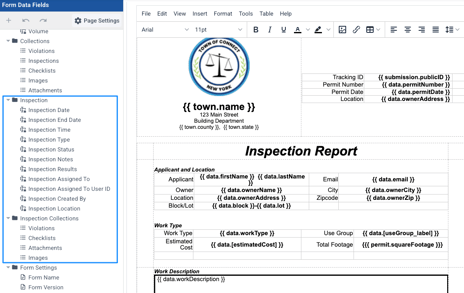
- Assign the report: In the Form Settings > Inspections tab, select your custom report from the "Inspection Report Template" dropdown
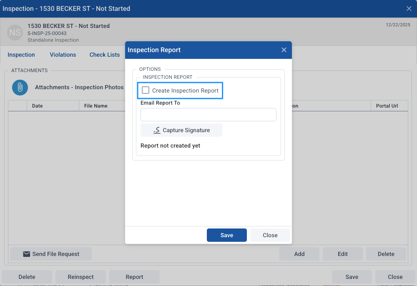
- Generate reports: When generating an inspection report from the Inspections data grid or from the Mobile app, the system uses the custom template instead of the default format
- View results: Generated reports appear as attachments on the inspection with all configured data elements, signatures, and collections displayed according to your template design
Impact: SDL Connect municipalities can now create inspection reports that meet their specific legal requirements and operational needs, eliminating the need for manual additions to stock reports and ensuring compliance with local regulations while maintaining professional, branded documentation.
Improvements
Complaints - Portal Request ID Now Displayed
Added a Portal Request ID (PR-xxxxxx) column to the Complaints data grid, allowing staff to look up citizen-submitted complaints using the tracking number citizens receive.
What's new:
- Portal Request ID column added to Complaints data grid
- Portal Request ID available in the Search dropdown menu for easy lookup
How it works: The Portal Request ID column displays the PR-xxxxxx number that citizens see on their portal requests page. This field is populated for complaints submitted through the web portal. Staff can now search for and filter complaints by this ID, matching the information citizens provide when contacting the town.
Note: Complaints created directly within Connect will not have a Portal Request ID.
Impact: Municipal staff can now efficiently look up citizen-submitted complaints using the exact tracking number provided to citizens, eliminating confusion and improving customer service response times without requiring staff to navigate outside of Connect or request additional information from callers.
Permit Fee Report - Additional Fee Columns Now Dynamic
Enhanced the ‘Permits - Fees’ report to display dynamic, context-appropriate additional fee columns based on the selected form.
What's new:
- When "All Forms" is selected, Additional Fee 1/2/3 columns are now hidden from the report
- When a specific form is selected, additional fee column headers headers show the actual fee name (e.g., "Plan Review Fee") instead of generic labels (e.g., "Additional Fee 1")
How it works:
- All Forms view: Generic additional fee columns are removed since fee names vary across different forms
- Single form view: The report displays only the additional fees configured for that form, using the custom fee names as column headers
- Partial configuration: If a form has only some additional fees configured (e.g., Additional Fee 1 and 2 but not 3), only the configured fees appear with their custom names
Impact: SDL Connect users now see clearer, more meaningful fee reports with column headers that match their configured fee names, making financial reports easier to understand and reducing confusion when reviewing permit fees across different forms.
Fixed Issues
Form Printing - Duplicate Browser Tab Issue
Fixed an issue where clicking "Print" in the Print Form modal was opening two browser tabs instead of one.
Impact: SDL Connect users now have a cleaner, more predictable printing experience without duplicate tabs appearing, streamlining the form printing workflow.
Permits - Validator Type Dropdown Removed from Validator Options
Removed the non-functional Validator Type dropdown from the validator editing interface in Form Settings.
What was fixed:
- The Validator Type dropdown has been removed from the validator edit modal.
- When editing a validator in Form Settings > Permit tab > Validator Options, users can now only edit the Label Name, which is the intended functionality.
Impact: SDL Connect users now have a clearer, simplified interface when editing validators. The removal of the non-functional dropdown eliminates confusion and ensures users understand that only the Label Name can be edited for existing validators.
Reports - Background Images No Longer Cut Off
Fixed an issue where portrait-formatted reports with background images were being cut off due to unnecessary padding and margins.
What was fixed:
- Removed extra padding and margin that was being applied to portrait-formatted reports with background images, allowing the full background image to display correctly.
- Landscape-formatted reports (such as certificates) were not affected and continued to display properly.
Impact: SDL Connect users can now generate portrait-formatted reports with background images that display the complete image without truncation, ensuring professional-looking documents that match the intended design across all report orientations.