Note: Some features require a license in order to access functionality. When applicable, this is noted. If you try to access a licensed feature your organization does not currently subscribe to, the system will display a message letting you know you currently are not licensed for that functionality.
Improvements
Form Submissions - Receipt Generation
Added the ability to print receipts for counter payments and cash payments on form submissions, ensuring all payment methods generate proper documentation.
What changed:
- The "Print Receipt" button now works for all payment types, including counter
payments and cash - Previously, receipts could only be generated for electronic payments
How it works:
- Add a counter or cash payment to a form submission
- Click "Print Receipt" on the Additional tab
- Receipt displays for the most recent payment on the submission, with
payment details for customer records
Benefits: Payment receipts can now be provided to all citizens, regardless of payment method, ensuring consistent documentation and customer service whether payments are made online, by card swipe, cash, or check.
Permit Invoices - Permit Number Now Displayed
Added permit number to invoice headers, providing clearer identification for permit-related payments. The tracking number always displays. The permit number appears if it has been generated.
Benefits: Invoices now include the permit number, making it easier for applicants and staff to match invoices to specific permits and streamlining payment processing and record-keeping.
Record Deletion - Comprehensive Delete Functionality Added
Added the ability to delete individual records directly in Connect, providing users with greater control over data management and cleanup.
What's new
Delete capability added for the following record types:
- Checklists
- Inspections
- Permits
- Professionals
- Projects
- Property Notifications
- Statutes
- Violations
- Work Orders
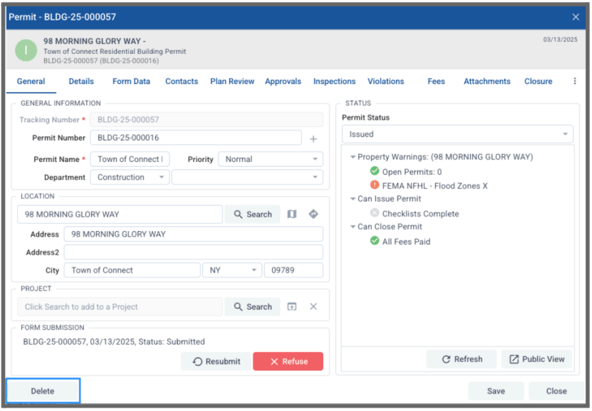
How it works
Users must be added to a role with the appropriate delete permissions in order to delete these record types
Users must confirm before deleting to avoid accidental removals
Deleted records no longer appear in data grids, search results, or reports
Important restrictions
Permits with associated payments cannot be deleted
Users without delete permissions will see the delete option but will receive a message stating they don’t have permission when attempting to delete an item
The ‘Administrators’ system role does not have permission to delete records by default
Fixed Issues
Form Payments - "Payment Must be Approved" Setting
Fixed an issue where the "Payment Must be Approved" setting on payment elements had no effect, allowing charges to process immediately instead of requiring municipal approval first.
Benefits: Municipalities now have control over which payments are processed, allowing them to review submissions for completeness and accuracy before charging applicants. This prevents incorrect charges and gives staff the ability to request additional information before processing payments.
Form Submission PDFs - Improved Table Header Contrast
Fixed an accessibility issue where table column headers on form submission PDFs had insufficient color contrast, making them difficult to read.
Impact: Form submission PDFs are now more accessible and easier to read for all users, including those with visual impairments. Table column headers are clearly legible in both the automatically generated submission PDF and printed versions.
Permit Data Grid - Additional Fee 3 Now Available
Added the Additional Fee 3 and Additional Fee 3 fields as available columns in the Connect permit data grid and export options.
Impact: SDL Connect users can now view and export all three additional fees fields from the permit data grid, ensuring complete fee information is available for reporting and analysis when permits include multiple additional fees.
Reports - Form List Elements Now Display Correctly
Fixed an issue where list elements and other non-text form inputs were appearing blank on generated reports when their Data ID field contained spaces.
Impact: Engineering users can now reliably use list elements and other form components in custom forms with any Data ID naming convention, and all selected values will display correctly on generated reports, ensuring complete and accurate documentation of form submissions.
Reports - Page Break Element Now Functions Correctly
Fixed an issue where page break elements added in the report designer would not create actual page breaks in rendered reports.
Impact: Users can now create multi-page reports with content organized across specific pages.