Note: Some features require a license in order to access functionality. When applicable, this is noted. If you try to access a licensed feature your organization does not currently subscribe to, the system will display a message letting you know you currently are not licensed for that functionality.
Improvements
Enhanced List Sorting and Filtering
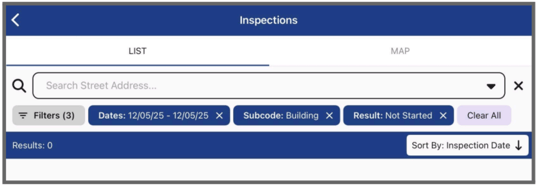
Added flexible sorting options and improved filter visibility for inspection lists, giving inspectors better control over how they view and organize their inspections.
What's new:
- Sort By Button: Easily toggle between ascending and descending order for the chosen Sort By type
- Enhanced Filter Display: All applied filters now visible on the list page with clear labels (e.g., "street name: 123")
- Quick Filters Access: New "Filters" button under search bar for easier access to advanced filtering options
- Sort Field Visibility: Current sort field displays on both the list view and individual inspection items
How it works:
- Select your preferred sort field in advanced filters
- Use the Sort By button to switch between ascending (earliest first) and descending (most recent first) order
- View all active filters at a glance on the list page
Enhanced Best Route Capacity
Enhanced the Best Route feature with several updates.
What's new:
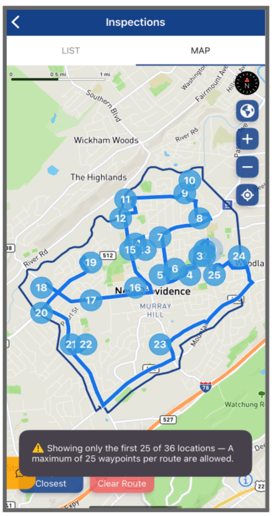
- Increased Capacity: Route up to 25 inspections in a single optimized trip (limit increased from 10)
- Smart Grouping: Inspections at the same address/coordinates are grouped together, counting as a single waypoint
- Round Trip Routing: Routes start and end at your current location, with optimized waypoints in between
- Enhanced Dark Mode: Improved route line visibility for dark mode
- Warning System: Alerts when attempting to route more than 25 locations
How it works: The Best Route feature calculates the most efficient route for visiting all selected inspections. Your location serves as the start and end point, with all inspections optimized as waypoints along the way.
Benefits: Inspectors with 11+ daily inspections can now route their entire day's workload efficiently, saving time and fuel costs. The improved routing better handles typical inspection loads while providing clear navigation guidance.
Fixed Issues
Complaints - Photos and Attachments Now Save Correctly
Fixed an issue where photos and attachments uploaded to complaints would not persist after saving and syncing.
Impact: Users can now reliably document complaints with photos and attachments in the field. Previously, images would disappear after saving and syncing, requiring staff to re-upload documentation or return to Desktop to add attachments.
Inspection Calendar Reliability Improvement
Resolved an issue where inspections would fail to display on the calendar for some inspectors.
Impact: Inspectors will no longer experience missing calendar data, ensuring reliable access to their scheduled inspections across all modules.